
Tatiora Tatiora

NOW AVAILABLE: Object Desktop 2019 and Exclusive DeskScapes 10 Beta

NOW AVAILABLE: Object Desktop 2019 and Exclusive DeskScapes 10 Beta

Object Desktop members get to try the new DeskScapes before it releases

Object Desktop 2019 is here
Object Desktop is a powerful suite of desktop enhancements that transforms your Windows
experience. It’s like getting the next version of Windows today.

Object Desktop owners are the first to test beta versions of software before
they’re ever released and you get free updates to all Object Desktop applications.

What’s Coming in Object Desktop 2019:

  • Brand New Applications, starting with DeskScapes 10, which will let you completely personalize your desktop wallpaper with animations, pictures, and video.
  • New Object Desktop Manager, (coming soon) with a sleek new look, making it easier to access betas and install, update, and manage your applications.
  • Major Updates to your favorite Object Desktop applications.

Renew Object Desktop
Reg. Price: $49.99
Renewal Price: $19.99
Special Discount Price: $14.99*

Upgrade to Object Desktop
Reg. Price: $49.99
Upgrade Price: $24.99
Special Discount Price: $14.99*

Get Object Desktop
Reg. Price: $49.99
Sale Price: $29.99
Special Discount Price: $19.99* 


Try the DeskScapes 10 Beta Now
Stardock is pleased to announce a major new version of DeskScapes
Personalize your desktop wallpaper with animations, pictures and video.

The new version includes updates based on customer feedback such as:

  • A new wallpaper manager, complete with the ability to mark “favorite” backgrounds, as well as modifying and saving both static and animated wallpapers.
  • Seamless WinCustomize library integration allows direct browsing and downloading of backgrounds from within the application.
  • Comes in light and dark theme modes to suit your personal tastes.
  • Supports h264 videos with hardware accelerated decoding where possible.
  • New additional effects you can apply to static and animated wallpapers which can now easily be combined and ordered.


The DeskScapes UI has had a complete overhaul

As well as the obvious dark / light mode, the interface now splits the list in to folders allowing improved management of your backgrounds.
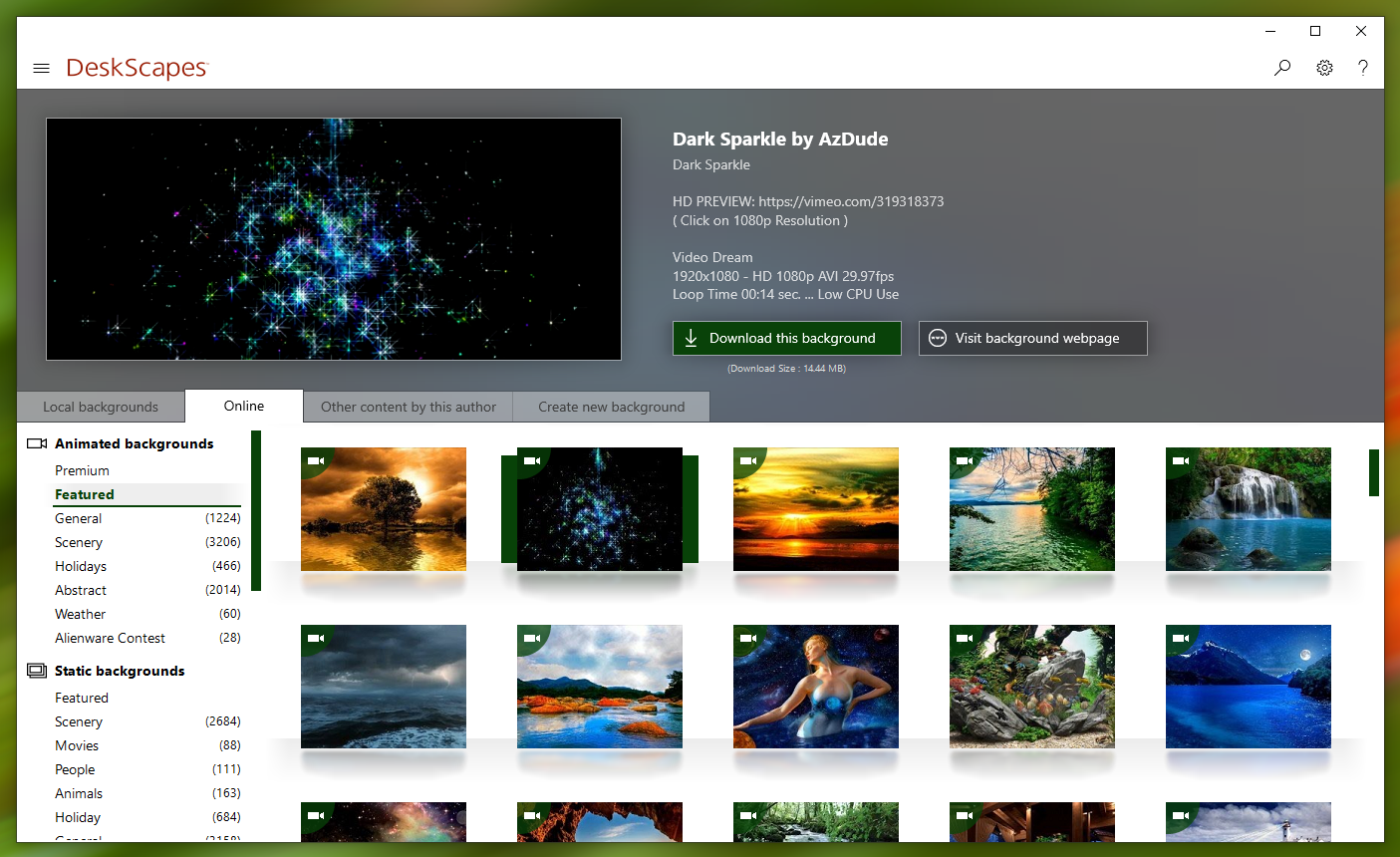
 

DeskScapes now allows you to browse the WinCustomize library directly from the app

Directly browsing the WinCustomize library from within the application puts new backgrounds a click away and offers greater exposure of new Deskscapes and wallpaper backgrounds to other users.


Apply effects and now apply more than one at once

If you've ever found yourself loading up an image into a photo editing app to tweak it to make for a better desktop background, look no further than DeskScapes 10.  The beta includes over 60 effects, along with the ability to combine multiple effects to give users the ability to turn pretty much any image or video file into a usable desktop background.


DeskScapes 10 beta is available for Object Desktop subscribers today.
A stand-alone version is expected to be released this Spring.

Renew Object Desktop
Reg. Price: $49.99
Renewal Price: $19.99
Special Price: $14.99*

Upgrade to Object Desktop
Reg. Price: $49.99
Upgrade Price: $24.99
Special Price: $14.99*

Get Object Desktop
Reg. Price: $49.99
Sale Price: $29.99
Special Price: $19.99* 

Visit www.objectdesktop.com to learn more.


*Sale ends 3/26/2019 at 1PM ET.

272,040 views 107 replies
Reply #77 Top

Ok, after running the batch purge file 3X, with the same results as in my video, I uninstalled DS with a 3rd party uninstaller. Then I manually cleaned the registry of ever sign of DS I could find. Then I purged again, then rebooted.


Upon reboot, I ran the purge yet again, then I installed DS as admin.  Still have the no codec found issue, and several dreams load, run maybe 6 seconds, then back to my regular wallpaper.


A scant few dreams load and run fine.


I sure hope yall get this fixed. 

Reply #78 Top

Quoting RedneckDude, reply 77

Upon reboot, I ran the purge yet again, then I installed DS as admin.  Still have the no codec found issue, and several dreams load, run maybe 6 seconds, then back to my regular wallpaper. 

The codec thing I want to table  - we can circle back to it but I want to work on your other issue first - the reversion to a standard wallpaper while a video dream is running.

Have you done the clean boot, RND?

https://forums.stardock.com/485954/deskscapes-support-faq#cleanboot

As you surely know, it will strip Windows to its base, under a new WinAdmin account, with just the DS service manually restarted, to see if there are settings / 3rd party app conflicts.

Quoting RedneckDude, reply 77
A scant few dreams load and run fine.

Can you give me a sample (links) of dreams (2) that revert and some that do not - that work fine?

----------------
Sean Drohan
Stardock Customer Service Manager

Reply #79 Top

After it has reset I would be interested in knowing what the wallpaper key says here : HKEY_CURRENT_USER\Control Panel\Desktop

Reply #80 Top

Quoting sdRohan, reply 78

Can you give me a sample (links) of dreams (2) that revert and some that do not - that work fine?
I will do the clean boot. I haven't yet.  Just want to say that from this point forward anything I do to help here will be in order to help everyone else.  DeskScapes really isn't THAT important to me, I'm tired of dealing with it. But you guys are trying to help, so I will try to help as well.

Sean, as I said before, the search function in the skin gallery doesn't work very well, so it's hard to track some of these dreams down. They have been in my collection since DS was born.  May I suggest that in the future, could ALL dreams have the button to view online? That would make it so much easier to track down where these dreams came from. You already have the function for the online section in DS config.


Today is the day I pay my bills, so I will work on this issue with you as time allows.  Thanks again for helping.

Reply #81 Top

Quoting Neil, reply 79

After it has reset I would be interested in knowing what the wallpaper key says here : HKEY_CURRENT_USER\Control Panel\Desktop


C:\Users\Jimmy\AppData\Local\stardock\deskwall.bmp

Reply #82 Top

Clean boot, about everything runs, sometimes locking up on changing dreams. The ones with no codec remain the same.

Reply #83 Top

Strangely, after the clean boot, I went back to normal boot under my normal login and pretty much all dreams run, or have the missing codec error.


Reply #84 Top

oldwall works great on Descapes 8, does not work on DS 10. ? Is there a registry fix fro that?

Otherwise I have NO problems with DS 10

Reply #85 Top

Quoting S, reply 84

oldwall works great on Descapes 8, does not work on DS 10. ? Is there a registry fix fro that?

Otherwise I have NO problems with DS 10

I answered on the other Thread , just post on one Thread Not Both .

Reply #86 Top

If I recall correctly, I didn't have the no decoder found issue with DS8. I may revert.

Reply #87 Top

Quoting RedneckDude, reply 86

If I recall correctly, I didn't have the no decoder found issue with DS8. I may revert.

In DS settings switch the video engine to one of the DirectShow settings.

Reply #88 Top

Well, I'll be damned.  All that hassle before and all I had to do was choose a setting....


Thanks, Neil!  Love ya, man!

Reply #89 Top

Quoting RedneckDude, reply 88

Well, I'll be damned.  All that hassle before and all I had to do was choose a setting....

Thanks, Neil!  Love ya, man!

Very glad to hear that and this has sparked a conversation internally about making it prompt in such cases.

Thanks for your help and feedback here, RND.

----------------
Sean Drohan
Stardock Customer Service Manager

Reply #90 Top

Glad to have helped, Sean, if in fact I did...lol.  I still don't quite get what happened, but after the clean boot things got better. Maybe I turned something off and forgot to turn it back on.


Reply #91 Top

The good ol standard .. IrfanView, also lets you set an image as your basic Windows wallpaper too.  When you're viewing an image, click the Options menu at the top and near the bottom you'll see.. Set as Wallpaper > (sub-menu has various ways to set it as wallpaper). I know a few people who'd never even think of doing it another way since it's their main image viewer/converter/etc.  Hope that helps with your dilemma.  Let us know.

Ah, I know that Win10 has a separate setting for system background color.  It's been a while since I dealt with Win7 but, it probably does as well and it sounds like yours is set at white.  ~Someone else here who can confirm/expand on this aspect of Win7...~

Reply #92 Top

Myrddin, the issue is with video/animated wallpapers, not images.  But thanks for the input. 

Reply #93 Top

Ah, I misunderstood. I thought it was the background/wallpaper after turning Deskscapes off.  My bad.

Reply #94 Top

Understood. That subject was touched on as well.  My bad.


Reply #95 Top

Here is what I'm talking about

Deskscapes running

After Deskscapes disabled

Reply #96 Top

Hello,

Sorry to hear you are having issues.

When I click on Disable Deskscapes My Wallpaper came back .. not blank screen


AzDude
Stardock Community Assistant

Reply #97 Top

Wish I knew how to fix this. It never happened with Deskscapes 8.

As I mentioned before I'm running Win 7 Ultimate x64.


Reply #98 Top

Quoting S, reply 97

Wish I knew how to fix this. It never happened with Deskscapes 8.

If you then use Windows to set a desktop image:

Then repeat the process, does it work then?

----------------
Sean Drohan
Stardock Customer Service Manager


Reply #99 Top

No. Every time I disable the desktop is blank

I have my own wall changer. Also, when My computer starts and I use right click the desktop does the same thing.

NEVER happened with Deskscapes 8 

Reply #100 Top

Quoting S, reply 99

No. Every time I disable the desktop is blank

I have my own wall changer. Also, when My computer starts and I use right click the desktop does the same thing.

NEVER happened with Deskscapes 8 

Disable your own wall changer .. Reboot.

and test DS10 and report back.
