
Tatiora Tatiora

NOW AVAILABLE: Object Desktop 2019 and Exclusive DeskScapes 10 Beta

NOW AVAILABLE: Object Desktop 2019 and Exclusive DeskScapes 10 Beta

Object Desktop members get to try the new DeskScapes before it releases

Object Desktop 2019 is here
Object Desktop is a powerful suite of desktop enhancements that transforms your Windows
experience. It’s like getting the next version of Windows today.

Object Desktop owners are the first to test beta versions of software before
they’re ever released and you get free updates to all Object Desktop applications.

What’s Coming in Object Desktop 2019:

  • Brand New Applications, starting with DeskScapes 10, which will let you completely personalize your desktop wallpaper with animations, pictures, and video.
  • New Object Desktop Manager, (coming soon) with a sleek new look, making it easier to access betas and install, update, and manage your applications.
  • Major Updates to your favorite Object Desktop applications.

Renew Object Desktop
Reg. Price: $49.99
Renewal Price: $19.99
Special Discount Price: $14.99*

Upgrade to Object Desktop
Reg. Price: $49.99
Upgrade Price: $24.99
Special Discount Price: $14.99*

Get Object Desktop
Reg. Price: $49.99
Sale Price: $29.99
Special Discount Price: $19.99* 


Try the DeskScapes 10 Beta Now
Stardock is pleased to announce a major new version of DeskScapes
Personalize your desktop wallpaper with animations, pictures and video.

The new version includes updates based on customer feedback such as:

  • A new wallpaper manager, complete with the ability to mark “favorite” backgrounds, as well as modifying and saving both static and animated wallpapers.
  • Seamless WinCustomize library integration allows direct browsing and downloading of backgrounds from within the application.
  • Comes in light and dark theme modes to suit your personal tastes.
  • Supports h264 videos with hardware accelerated decoding where possible.
  • New additional effects you can apply to static and animated wallpapers which can now easily be combined and ordered.


The DeskScapes UI has had a complete overhaul

As well as the obvious dark / light mode, the interface now splits the list in to folders allowing improved management of your backgrounds.
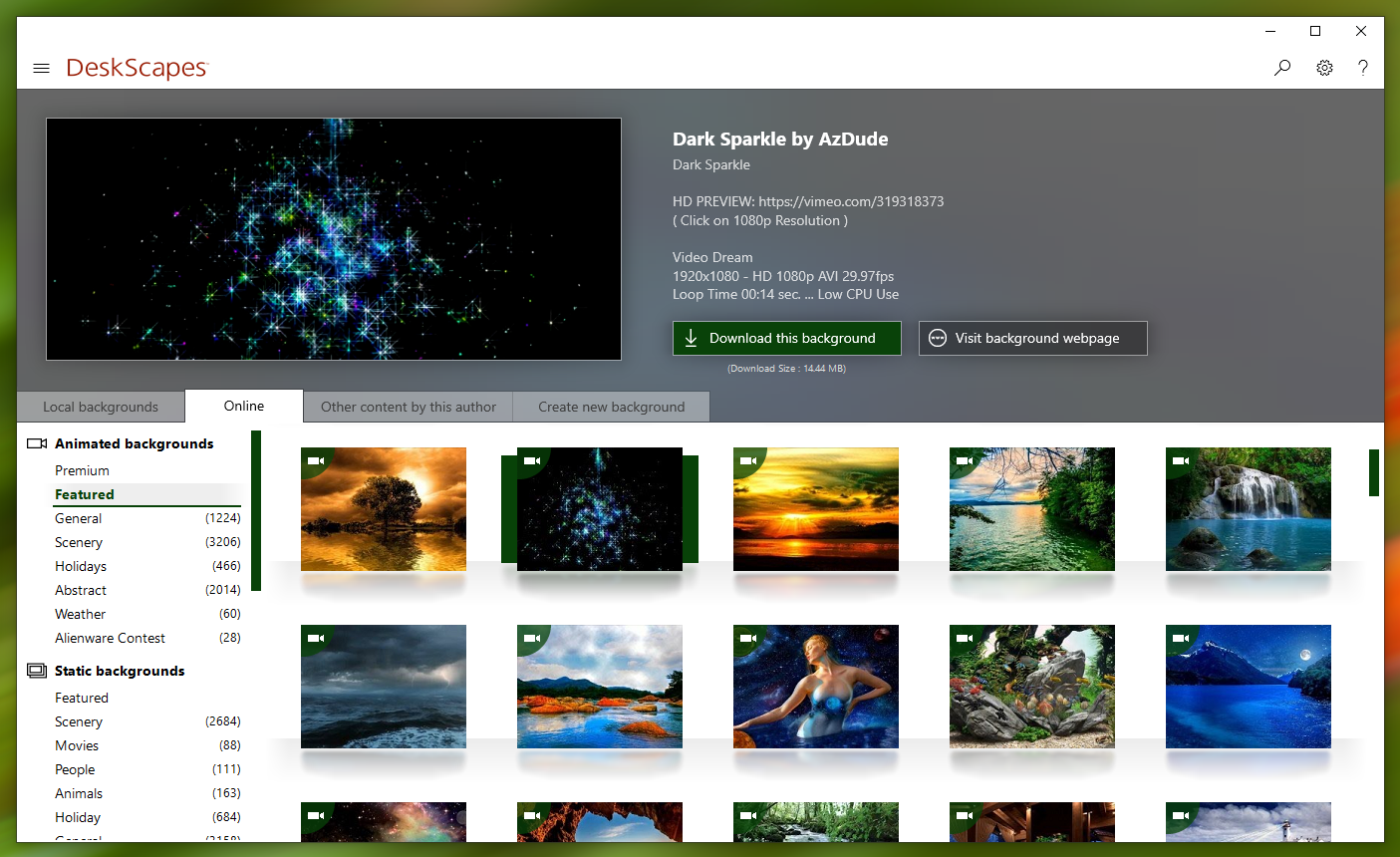
 

DeskScapes now allows you to browse the WinCustomize library directly from the app

Directly browsing the WinCustomize library from within the application puts new backgrounds a click away and offers greater exposure of new Deskscapes and wallpaper backgrounds to other users.


Apply effects and now apply more than one at once

If you've ever found yourself loading up an image into a photo editing app to tweak it to make for a better desktop background, look no further than DeskScapes 10.  The beta includes over 60 effects, along with the ability to combine multiple effects to give users the ability to turn pretty much any image or video file into a usable desktop background.


DeskScapes 10 beta is available for Object Desktop subscribers today.
A stand-alone version is expected to be released this Spring.

Renew Object Desktop
Reg. Price: $49.99
Renewal Price: $19.99
Special Price: $14.99*

Upgrade to Object Desktop
Reg. Price: $49.99
Upgrade Price: $24.99
Special Price: $14.99*

Get Object Desktop
Reg. Price: $49.99
Sale Price: $29.99
Special Price: $19.99* 

Visit www.objectdesktop.com to learn more.


*Sale ends 3/26/2019 at 1PM ET.

272,039 views 107 replies
Reply #26 Top

I understand the right click to produce a backround. I just wonder why After using DS 10 my wallpaper is gone. The desktop has no wallpaper and the desktop is blank. Maybe a glitch on my part?

Don't get me wrong, I'm looking forward to DS 10. I love all the new tweaks.Just thought you should know what's going on with my machine. :blush:  

Reply #27 Top

If you use the disable Deskscapes option it will reset your desktop to whatever it was set to before Deskscapes was enabled.  This is stored in the oldwall registry key.

Reply #28 Top

It does not restore the wall. Like I said, the desktop is just all white.

Reply #29 Top

I'm trying to extend my current Object Desktop subscription and I can't figure out how to take advantage of the sale.  Clicking "Extend" in the Object Desktop Manager takes me to a shopping cart on store.stardock.com with an amount of $19.99.

TIA for any help.

Reply #30 Top

Quoting Victechnical, reply 29

I'm trying to extend my current Object Desktop subscription and I can't figure out how to take advantage of the sale.  Clicking "Extend" in the Object Desktop Manager takes me to a shopping cart on store.stardock.com with an amount of $19.99.

TIA for any help.

Hello,

I have forwarded your question to Stardock Support team for their assistance. Please keep an eye on this thread for any updates. We appreciate your feedback and patience.


Basj

Stardock Community Assistant.

Reply #31 Top

Quoting basj, reply 30

Hello,

I have forwarded your question to Stardock Support team for their assistance. Please keep an eye on this thread for any updates. We appreciate your feedback and patience.

Basj

Stardock Community Assistant.

Thanks, but I figured it out and don't need further assistance :-)

 
Reply #32 Top

Quoting Victechnical, reply 31

Thanks, but I figured it out and don't need further assistance

Great, glad you figured it out.

Thank you,


Basj,

Stardock Community Assistant

Reply #33 Top

Ok, How did you figure it out? I'd like to know too.

Reply #34 Top

Quoting S, reply 33

Ok, How did you figure it out? I'd like to know too.

But "Victechnical" was having problem/question on his OD Subs, you are having problem on all white wallpaper?

I woulld suggest for you to try the following:

-For Win8/10 Users: Open the Start Screen, and type 'cmd'. Right-click on the search result and select 'Run as administrator' from below.

-For 7 Users: click Start, in the start search field type 'cmd'. Right-click on the search result and select 'Run as administrator'.

-Type: sfc /scannow

-Wait for the scan to complete (this can take several minutes)

Some help on how this looks should you need it:

https://support.microsoft.com/en-us/help/929833/use-the-system-file-checker-tool-to-repair-missing-or-corrupted-system

If the SFC finds errors, but cannot fix them, please also run the following command in the same command prompt window:

dism.exe /online /Cleanup-Image /RestoreHealth

Some help on how this looks should you need it:

https://www.windowscentral.com/how-use-dism-command-line-utility-repair-windows-10-image

The above command should assist with replacing any damaged or problematic system files. Please note, however, since it may require restoring certain files, this process can take some time and you will need to be patient until it has completed.

Please let us know whether this resolves your problem or if you have any additional questions.

Thank you,


Basj,

Stardock Community Assistant

Reply #35 Top

Quoting S, reply 33
Ok, How did you figure it out? I'd like to know too.

When you click the Renew Object Desktop link at the beginning of this thread it takes you to this webpage:

https://www.stardock.com/products/odnt/renew

The price shown is $19.99, however when you click the "Get It Now" button the site checks your eligibility for the upgrade and adds an additional $5.00 discount.  Get it while the sale is active :-)

Reply #36 Top

Get it while its hot. It was steamin' when I renewed. Lol:P  

Reply #37 Top

Not sure where to give feedback, but Deskscapes 10 Beta is not playing nice with latest version of Fences. Basically, since the Deskscapes installation, hovering over my fences has them flickering and disappearing. You can still click on an unseen icon if you are in the right spot. Not sure if you were aware of this or not???

Reply #38 Top

Quoting Sunwheel9, reply 37

Not sure where to give feedback, but Deskscapes 10 Beta is not playing nice with latest version of Fences. Basically, since the Deskscapes installation, hovering over my fences has them flickering and disappearing. You can still click on an unseen icon if you are in the right spot. Not sure if you were aware of this or not???

Hello

Would you Please try this PURGE: https://forums.stardock.com/486084/fences-support-faq#reinstalling

Reboot and ReInstall the latest version from your account , please.

Let us know if that worked for you , Thanks.


AzDude
Stardock Community Assistant

Reply #39 Top

I am lost. I ran the bat file, and it gave me a message if I am asked to reboot click no, and the next screen that comes up is asking me to reboot and the only button is an OK button. Then a popup asks for my serial number, but Fences never gets uninstalled. Are the instructions wrong? I rebooted and that made no difference a Fences was still installed. This is entirely confusing.

Reply #40 Top

Quoting Sunwheel9, reply 39

I am lost. I ran the bat file, and it gave me a message if I am asked to reboot click no, and the next screen that comes up is asking me to reboot and the only button is an OK button. Then a popup asks for my serial number, but Fences never gets uninstalled. Are the instructions wrong? I rebooted and that made no difference a Fences was still installed. This is entirely confusing.

Run the Deskscapes Purge https://forums.stardock.com/485954/deskscapes-support-faq#reinstalling

and REBOOT then go to your account and install

the beta version https://store.stardock.com/myaccount/products/

In Fences you can open the fences app and pick a snapshot to restore a set up your like 


Reply #41 Top

Well now everything is screwed up. What a dman nightmare. Finally got Deskscapes off my damn computer and uninstalled Fences. Reinstalled Fences and almost all settings and icons gone. It will take me hours to figure out where everything went. I can't even get Fences to do what it did when everything was working perfectly which is all the Fences were hidden until I moused over them. All I can get is a mouseover that makes the title of the fence appear. I really did n't expect Deskscapes to screw Fences up like this or I would never had installed the beta.

Reply #42 Top

Ok, got that back to almost normal. Now I am going to reinstall Deskscapes after a reboot.


Reply #43 Top

NOPE - did not work. I just wasted the last few hours. Still made Fences icons flicker and not be able to be seen except for a split second. And yes, Fences was working fine before I reinstalled Deskscapes.

Reply #44 Top

What version of fences are using and on which OS?

What you are reporting is not normal and could be a conflict with something else other than fences.  Are you running anything else that might impact wallpapers like displayfusion or ultramon?

Reply #45 Top

First of all, I had no problems with the last version of Deskscapes and Fences. So whatever this is, it is directly attributable to the Deskscapes Beta. Fences is the newest version (3.09.11). This on Windows 10 Build 1809. Nothing else running with regard to wallpapers and nothing else has been installed other than uninstalling previous version of Deskscapes and installing the Deskscapes Beta.

Reply #46 Top

I should add that I paused Descscapes Beta and the fences with icons appeared with mouse over, but then became black opaque fence when the mouse moved out of the fence.

Also, there is no way to shut it down. I tried using Task Manager to kill it and iut stayed running (yes, shut down Deskscapes and its services and it stayed running).

Is there support for this where we should be reporting problems to people who are working on the Beta??????????????????????????????????????? Am I in the wrong place?

Reply #47 Top

Quoting Sunwheel9, reply 46

I should add that I paused Descscapes Beta and the fences with icons appeared with mouse over, but then became black opaque fence when the mouse moved out of the fence.

Also, there is no way to shut it down. I tried using Task Manager to kill it and iut stayed running (yes, shut down Deskscapes and its services and it stayed running).

Is there support for this where we should be reporting problems to people who are working on the Beta??????????????????????????????????????? Am I in the wrong place?

Sorry for the slow respond. Its the weekends. I would like to suggest for you to update your codec pack by using this link : https://www.codecguide.com/download_k-lite_codec_pack_mega.htm

Try it and report back here.

Thank you,


Basj,

Stardock Community Assistant

Reply #48 Top

Codec pack changed nothing. Still flickering away and useless Fences.

Reply #49 Top

Quoting Sunwheel9, reply 48

Codec pack changed nothing. Still flickering away and useless Fences.

Hello,

I have forwarded your problem to Stardock Support team for their assistance. Please keep an eye on this thread for any updates. We appreciate your feedback and patience.


Basj

Stardock Community Assistant.

Reply #50 Top

Quoting Sunwheel9, reply 45

First of all, I had no problems with the last version of Deskscapes and Fences. So whatever this is, it is directly attributable to the Deskscapes Beta.

DS beta and something else - I can confidently say this as we have not seen it in internal testing and yours is the only report of its kind thus far.  We need to find out what is causing it to happen on your PC - what app or setting is conflicting with DS10.

To best accomplish that, we need to eliminate possibilities - a clean boot is the best way:

DS:
https://forums.stardock.com/485954/deskscapes-support-faq#cleanboot

Paired with the clean boot of Fences:

https://forums.stardock.com/486084/fences-support-faq#cleanboot

In the end, you want only the DS service running and Fences 'enabled' in the startup (their are two Fences entries in the Startup that need to be enabled).

Let us know if you still see the issue after please.

----------------
Sean Drohan
Stardock Customer Service Manager