NOW AVAILABLE: Object Desktop 2019 and Exclusive DeskScapes 10 Beta

Object Desktop members get to try the new DeskScapes before it releases

Object Desktop 2019 is here
Object Desktop is a powerful suite of desktop enhancements that transforms your Windows
experience. It’s like getting the next version of Windows today.

Object Desktop owners are the first to test beta versions of software before
they’re ever released and you get free updates to all Object Desktop applications.

What’s Coming in Object Desktop 2019:

  • Brand New Applications, starting with DeskScapes 10, which will let you completely personalize your desktop wallpaper with animations, pictures, and video.
  • New Object Desktop Manager, (coming soon) with a sleek new look, making it easier to access betas and install, update, and manage your applications.
  • Major Updates to your favorite Object Desktop applications.

Renew Object Desktop
Reg. Price: $49.99
Renewal Price: $19.99
Special Discount Price: $14.99*

Upgrade to Object Desktop
Reg. Price: $49.99
Upgrade Price: $24.99
Special Discount Price: $14.99*

Get Object Desktop
Reg. Price: $49.99
Sale Price: $29.99
Special Discount Price: $19.99* 


Try the DeskScapes 10 Beta Now
Stardock is pleased to announce a major new version of DeskScapes
Personalize your desktop wallpaper with animations, pictures and video.

The new version includes updates based on customer feedback such as:

  • A new wallpaper manager, complete with the ability to mark “favorite” backgrounds, as well as modifying and saving both static and animated wallpapers.
  • Seamless WinCustomize library integration allows direct browsing and downloading of backgrounds from within the application.
  • Comes in light and dark theme modes to suit your personal tastes.
  • Supports h264 videos with hardware accelerated decoding where possible.
  • New additional effects you can apply to static and animated wallpapers which can now easily be combined and ordered.


The DeskScapes UI has had a complete overhaul

As well as the obvious dark / light mode, the interface now splits the list in to folders allowing improved management of your backgrounds.
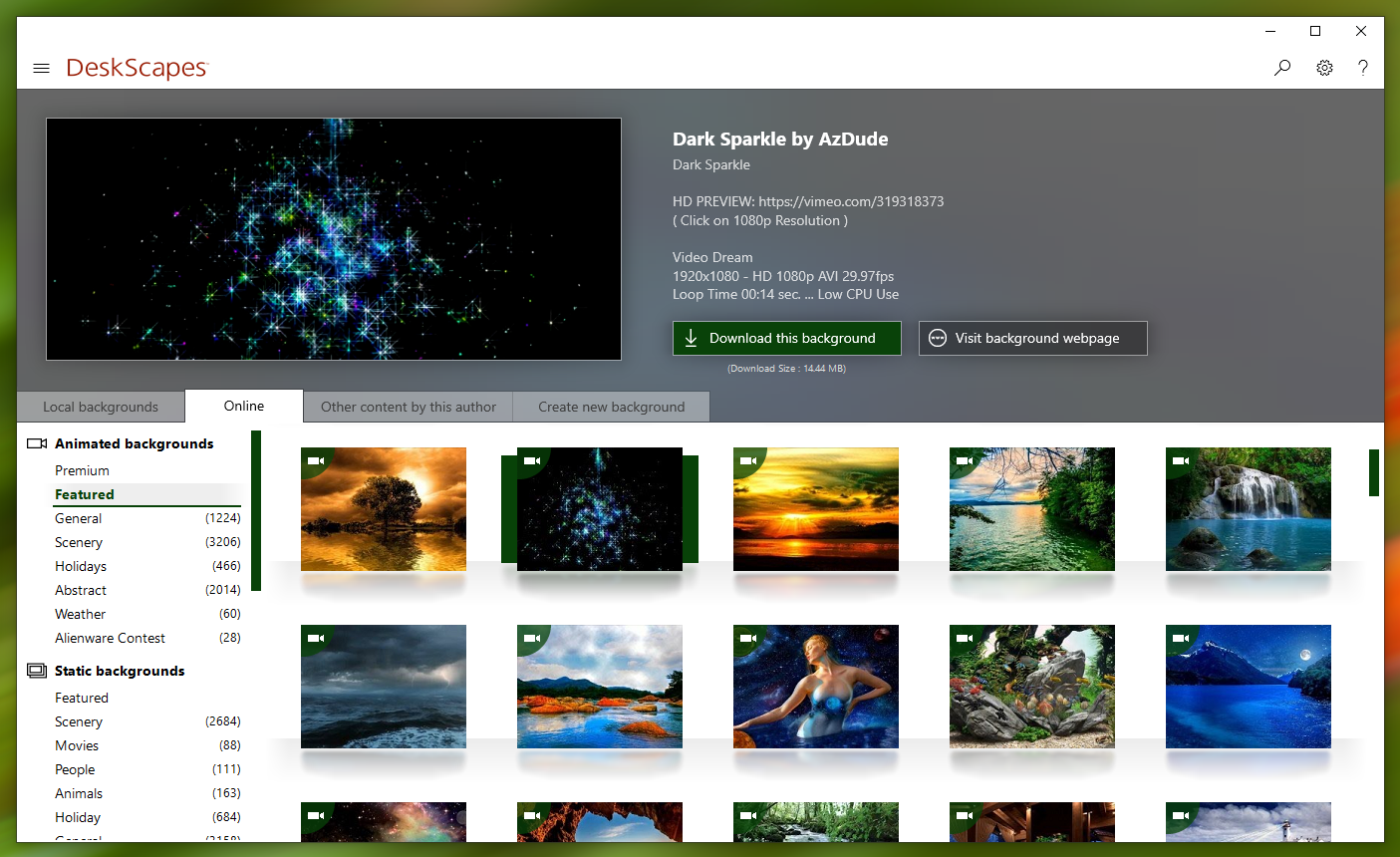
 

DeskScapes now allows you to browse the WinCustomize library directly from the app

Directly browsing the WinCustomize library from within the application puts new backgrounds a click away and offers greater exposure of new Deskscapes and wallpaper backgrounds to other users.


Apply effects and now apply more than one at once

If you've ever found yourself loading up an image into a photo editing app to tweak it to make for a better desktop background, look no further than DeskScapes 10.  The beta includes over 60 effects, along with the ability to combine multiple effects to give users the ability to turn pretty much any image or video file into a usable desktop background.


DeskScapes 10 beta is available for Object Desktop subscribers today.
A stand-alone version is expected to be released this Spring.

Renew Object Desktop
Reg. Price: $49.99
Renewal Price: $19.99
Special Price: $14.99*

Upgrade to Object Desktop
Reg. Price: $49.99
Upgrade Price: $24.99
Special Price: $14.99*

Get Object Desktop
Reg. Price: $49.99
Sale Price: $29.99
Special Price: $19.99* 

Visit www.objectdesktop.com to learn more.


*Sale ends 3/26/2019 at 1PM ET.

272,039 views 107 replies
Reply #2 Top

It works great. If you are using Display Fusion that has to be turned off and you don't need it any more. You can change wallpapers through DS for each monitor. 

Reply #3 Top

Just curious... not for Windows 7?

Reply #4 Top

5* 5*  5*  5*  5*  

Reply #5 Top

Quoting teddybearcholla, reply 3

Just curious... not for Windows 7?

Windows 7 is supported, yes.

----------------
Sean Drohan
Stardock Customer Service Manager

Reply #6 Top

No decoder found for this background. "Download decoder"
Downloaded the supposedly needed mpeg 2 decoder.
No decoder found for this background. "Learn more"

Guess I'll just wait for the final version instead, because I have almost every codec available for video editing/viewing already installed and I don't believe the mpeg 2 from MS Store is better than the one I already have, and most imortantly, the dreams are still not useable in this version. No reason some dreams no longer should work because they all do in Deskscapes 8 and the decoders are (obviously) available.

Reply #7 Top

Sorry for kinda offtop - If I buy now (Renew my subscription) - will the date of my subscription also change?
Worrying 'cos I have 280 days for my next subscripton updating (yeah, I usually do this at the end of the year))

Reply #8 Top

Quoting Yrgal, reply 6

No decoder found for this background. "Download decoder"
Downloaded the supposedly needed mpeg 2 decoder.
No decoder found for this background. "Learn more"

Guess I'll just wait for the final version instead, because I have almost every codec available for video editing/viewing already installed and I don't believe the mpeg 2 from MS Store is better than the one I already have, and most imortantly, the dreams are still not useable in this version. No reason some dreams no longer should work because they all do in Deskscapes 8 and the decoders are (obviously) available.

I installed all my saved dreams and most of them said I needed a decoder. I installed the one from the MS store and it still said I needed a decoder and DS froze. I shut DS down by the task manager. I restarted DS now no dreams work and if I apply a wallpaper it adds it to both screens doesn't matter which monitor I choose. 

Reply #9 Top

Quoting ALMonty, reply 8


Quoting Yrgal,


No decoder found for this background. "Download decoder"
Downloaded the supposedly needed mpeg 2 decoder.
No decoder found for this background. "Learn more"


Guess I'll just wait for the final version instead, because I have almost every codec available for video editing/viewing already installed and I don't believe the mpeg 2 from MS Store is better than the one I already have, and most imortantly, the dreams are still not useable in this version. No reason some dreams no longer should work because they all do in Deskscapes 8 and the decoders are (obviously) available.


I installed all my saved dreams and most of them said I needed a decoder. I installed the one from the MS store and it still said I needed a decoder and DS froze. I shut DS down by the task manager. I restarted DS now no dreams work and if I apply a wallpaper it adds it to both screens doesn't matter which monitor I choose. 

Hello Al,

Would you Please try this PURGE: https://forums.stardock.com/485954/deskscapes-support-faq#reinstalling

Reboot and ReInstall the beta version version from your account ( My Downloads ).

Test and check and report back , please.


AzDude
Stardock Community Assistant

Reply #10 Top

Quoting VFXer, reply 7

Sorry for kinda offtop - If I buy now (Renew my subscription) - will the date of my subscription also change?
Worrying 'cos I have 280 days for my next subscripton updating (yeah, I usually do this at the end of the year))

Hello VFXer , 

If your Object Desktop account is current you can go to your

account " My Downloads " and get the Beta download form there . 


AzDude
Stardock Community Assistant

Reply #11 Top

Thank you very much! (Geez! how can I missed this?!.. Feel so stupid now...)

Reply #12 Top

Regarding codec issues, Deskscapes defaults to using media foundation for videos which is more modern than DirectShow.  You almost certainly have codecs for DirectShow not media foundation.  The settings page in Deskscapes let's you pick DirectShow instead (near the bottom of the performance page I think)

Note that we strongly advise against the use of mpeg 2 for dreams and in fact would urge people to use h264 going forward.

The Microsoft mpeg 2 decoder is rather picky and your dreams are probably not valid mpeg 2 as per the official specs and the windows film and TV app would probably not play them either.

If you find deskscapes is acting oddly after applying a dream with a codec issue then sign in and out again and see if that helps.

+1 Loading…
Reply #13 Top

Quoting Neil, reply 12

Regarding codec issues, Deskscapes defaults to using media foundation for videos which is more modern than DirectShow. You almost certainly have codecs for DirectShow not media foundation. The settings page in Deskscapes let's you pick DirectShow instead (near the bottom of the performance page I think)

Note that we strongly advise against the use of mpeg 2 for dreams and in fact would urge people to use h264 going forward.

The Microsoft mpeg 2 decoder is rather picky and your dreams are probably not valid mpeg 2 as per the official specs and the windows film and TV app would probably not play them either.

If you find deskscapes is acting oddly after applying a dream with a codec issue then sign in and out again and see if that helps.
That's what I call useful information! Thank you, Neil! I will give it another run then, it seems.:thumbsup:  

Reply #14 Top

Quoting Neil, reply 12

Regarding codec issues, Deskscapes defaults to using media foundation for videos which is more modern than DirectShow.  You almost certainly have codecs for DirectShow not media foundation.  The settings page in Deskscapes let's you pick DirectShow instead (near the bottom of the performance page I think)

Note that we strongly advise against the use of mpeg 2 for dreams and in fact would urge people to use h264 going forward.

The Microsoft mpeg 2 decoder is rather picky and your dreams are probably not valid mpeg 2 as per the official specs and the windows film and TV app would probably not play them either.

If you find deskscapes is acting oddly after applying a dream with a codec issue then sign in and out again and see if that helps.

Reply #15 Top

The Warp Effect is nice, I think that's new (?). :thumbsup:  

Reply #16 Top

It's lovely to see the WC library integration.  It's much better than what we did with IconPackager "Featured".


When on the "Apply Effects" section a larger preview would be nice.  It's unlikely that the user will want or need the thumbnails of other dreams; why not use the lower half for effects and the top half for preview?

Reply #17 Top

You must reboot after install. Codecs worked after that.

Found that I can't change the one I'm using until I disable deskscapes and apply new one.

Reply #18 Top

Quoting S, reply 17

Found that I can't change the one I'm using until I disable deskscapes and apply new one.

For any dream or 1 in particular?

----------------
Sean Drohan
Stardock Customer Service Manager

Reply #19 Top

Quoting S, reply 17

You must reboot after install. Codecs worked after that.

Found that I can't change the one I'm using until I disable deskscapes and apply new one.

Did you uninstall older versions and then reboot before installing v10?

Reply #20 Top

Quoting sdRohan, reply 18

Quoting S J N,

Found that I can't change the one I'm using until I disable deskscapes and apply new one.


For any dream or 1 in particular?

----------------
Sean Drohan
Stardock Customer Service Manager

Any dream. Went back to 8 until 10 is out of beta.

Reply #21 Top

Quoting S, reply 20

Quoting sdRohan,


Quoting S J N,


Found that I can't change the one I'm using until I disable deskscapes and apply new one.


For any dream or 1 in particular?

----------------
Sean Drohan
Stardock Customer Service Manager


Any dream. Went back to 8 until 10 is out of beta.

That is a shame as odds are whatever is specific to your install will remain in release given we cannot reproduce that ourselves.

Reply #22 Top

Maybe it would help that I'm on Win 7 Ultimate. Also when using DS10 my wallpaper disappears.

Reply #23 Top

Quoting S, reply 22

Maybe it would help that I'm on Win 7 Ultimate. Also when using DS10 my wallpaper disappears.

Deskscapes replaces your wallpaper so a little unclear on what you mean?

Reply #24 Top

Quoting Neil, reply 23

Quoting S J N,

Maybe it would help that I'm on Win 7 Ultimate. Also when using DS10 my wallpaper disappears.


Deskscapes replaces your wallpaper so a little unclear on what you mean?

When I disable D S 10 my screen is white. I have to use Paint to load a wallpaper. Never had to do this with D S 8.

Reply #25 Top

Quoting S, reply 24

I have to use Paint to load a wallpaper

Curious. When I want to change wallpapers I just right click on the image I want and then click on set as desktop background. Why do you have to use paint to do that? Or am I not understanding it. A white screen is preventing you from accessing a folder where your walls are?