Fences 6.58 Beta Feedback
With the Fences 6.58 beta release, we are creating this thread so that users can report any observed issues.
Thank you for your interest and any time you put into making Fences 6 a better product.
With the Fences 6.58 beta release, we are creating this thread so that users can report any observed issues.
Object Desktop members can get beta and Insider builds from within Object Desktop Manager with 'Enable Object Desktop Insider builds' enabled:
Or via their download page in the ‘Object Desktop Insider’ section
If a beta was released, Object Desktop Members would see it in the ‘Object Desktop’ section.
Individual purchases would see it on their registration of the product under their download page.
Right-click the Product in Steam
Properties
Betas
Select the beta branch at the top right (there is no password)
Example
https://cdn.stardock.us/support/uploads/steamwebhelper_2024-02-19_17-44-35.png
Please include the following for anything found:
Exact Windows version \ build (winver.exe)
Detailed steps to recreate the issue seen
Screenshots and videos are very helpful. Videos can be uploaded to a cloud drive service (GoogleDrive, DropBox, OneDrive, YouTube), with a shared link included in your post. Images can be copied and pasted directly into a post.
If there are specific apps that the app does not work (well) with, please note what apps and their exact versions. If any app is not common, a link to a trial version would be appreciated.
Thank you for your interest and any time you put into making Fences 6 a better product.
10/01/2026
UI: 6.58
File Version: 6.5.8.1
Resolves issue where drag/dropping icon in rolled up group could fail.
New desktop spacing detection algorithm enabled by default for all icon sizes for upgraded installations. Should resolve issue of scrunched up icons for some installations with medium sized icons at 200%+ when changing DPIs & resolutions.
Improvements to scrollbar animations on rolled up groups.
Addresses installer issues resulting from ProgramData\Stardock folder settings.
Addresses occasional incorrect subscription expired error.
Latest translations added in localization update.
Known issues
While we appreciate all feedback, please remember that we offer no official support for beta \ preview \ developer channel versions of Windows. If you report issues while in any of those early release channels, you should not expect them to be addressed unless it still exists in a retail version of Windows.
Hello Stardock Support,
I'm experiencing a persistent desktop icon alignment issue with Fences 6 on Windows 11 Pro, and unfortunately, the latest 6.58 Beta has not resolved it.
My setup:
Windows 11 Pro
NVIDIA RTX 5080 (Studio Driver 617.42)
Intel Core Ultra 9 285K
Two 4K monitors:
XP-Pen Artist Pro 27 Gen 2 — primary display, 125% scaling
Dell 32-inch monitor — secondary display, 100% scaling
Fences 6.58 Beta (file version 6.5.8.1), previously 6.54
The problem:
Whenever Fences is enabled, desktop icons on my secondary Dell monitor become incorrectly positioned towards the right edge. Folder labels can extend beyond the monitor boundary and become partially visible on my XP-Pen display.
This happens even when there are no Fence groups or automatic sorting rules configured.
If I disable Fences, the desktop icon alignment immediately returns to normal.
I can also temporarily fix the issue by changing my primary display from the XP-Pen to the Dell and then switching it back. However, the problem returns after restarting Windows.
Troubleshooting already performed:
Completely removed all Fence groups and Folder Portals.
Disabled all automatic organisation rules.
Reinstalled the latest NVIDIA Studio Driver using the clean installation option.
Restarted Windows Explorer.
Tested both monitors at 125% scaling.
Used the Fences "Fix Desktop Icon Spacing" troubleshooting tool and restarted Windows.
Upgraded from Fences 6.54 to 6.58 Beta.
Unfortunately, none of these steps has provided a permanent solution.
Expected behaviour:
Fences should preserve normal Windows desktop icon positioning across monitors with different scaling settings, including after restarting Windows.
Could you please investigate whether this is a multi-monitor DPI scaling or desktop icon-spacing calculation bug in Fences 6?
I'd appreciate a permanent fix, as I would like to continue using Fences without having to reset my primary display after every restart.
Thank you for your assistance.
Hello Stardock Support,
I'm experiencing a persistent desktop icon alignment issue with Fences 6 on Windows 11 Pro, and unfortunately, the latest 6.58 Beta has not resolved it.
My setup:
The problem:
Whenever Fences is enabled, desktop icons on my secondary Dell monitor become incorrectly positioned towards the right edge. Folder labels can extend beyond the monitor boundary and become partially visible on my XP-Pen display.
This happens even when there are no Fence groups or automatic sorting rules configured.
If I disable Fences, the desktop icon alignment immediately returns to normal.
I can also temporarily fix the issue by changing my primary display from the XP-Pen to the Dell and then switching it back. However, the problem returns after restarting Windows.
Troubleshooting already performed:
Unfortunately, none of these steps has provided a permanent solution.
Expected behaviour:
Fences should preserve normal Windows desktop icon positioning across monitors with different scaling settings, including after restarting Windows.
Could you please investigate whether this is a multi-monitor DPI scaling or desktop icon-spacing calculation bug in Fences 6?
I'd appreciate a permanent fix, as I would like to continue using Fences without having to reset my primary display after every restart.
Thank you for your assistance.
Hello,
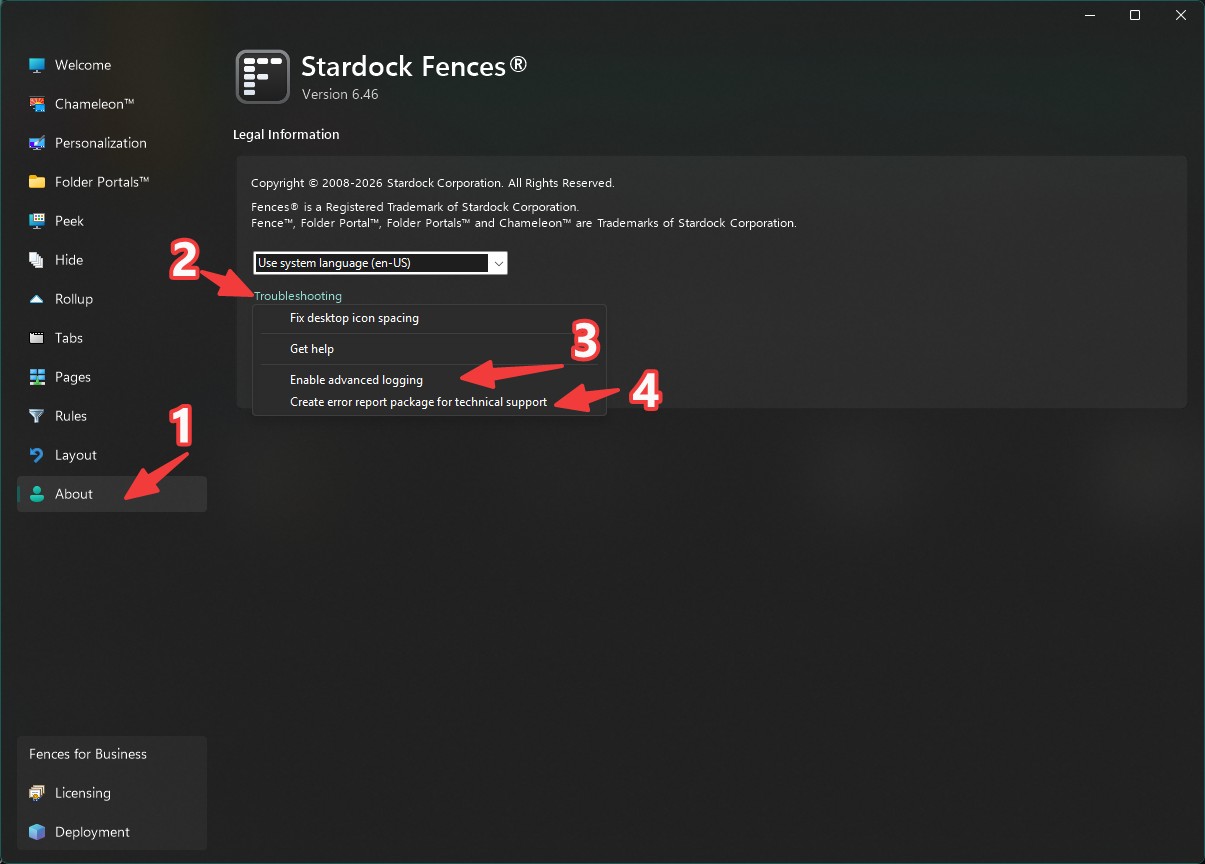
Sorry to hear you are having issues. Please turn on advance logging, reboot the system, reproduce the issue and create error report and send it in to support for review.
Thank you,
Basj,
Stardock Community Assistant.
Welcome Guest! Please take the time to register with us.
Select a reason for giving karma:
You're about to visit an external site:
Sign up here to get the latest news, updates, and special offers delivered directly to your inbox.