Abisnabidam Abisnabidam

AltTabby Open Beta Feedback

▼

AltTabby Open Beta Feedback

With the AltTabby Open Beta release today, we are creating this thread so that users can report any observed issues.

Obtaining the product

Object Desktop members can get the release from within Object Desktop Manager 

Individual purchases (as well as Object Desktop Members) can also be obtained from your account page: https://store.stardock.com/myaccount/products

For guest check-out purchase (no account), from this link: http://www.stardock.com/support/productkeyretrieval

Reporting an issue

Please include the following for anything found:

  • Exact Windows version \ build (winver.exe)

  • Detailed steps to recreate the issue seen

  • Screenshots and videos are very helpful.  Videos can be uploaded to a cloud drive service (GoogleDrive, DropBox, OneDrive, YouTube), with a shared link included in your post.  Images can be copied and pasted directly into a post.

  • If there are specific apps that the app does not work (well) with, please note what apps and their exact versions.  If any app is not common, a link to a trial version would be appreciated.


Thank you for your interest and any time you put into making AltTabby a better product.

4,696 views 87 replies | Pinned
Reply #76 Top

Following up, this seems related to my previous post. If I have an app with two windows open, once Alt-Tabby shows that app, it just toggles between those windows. Group windows of the same app was turned on, with it turned off the widows behaved normally. That might explain some of the behaviour I reported above.

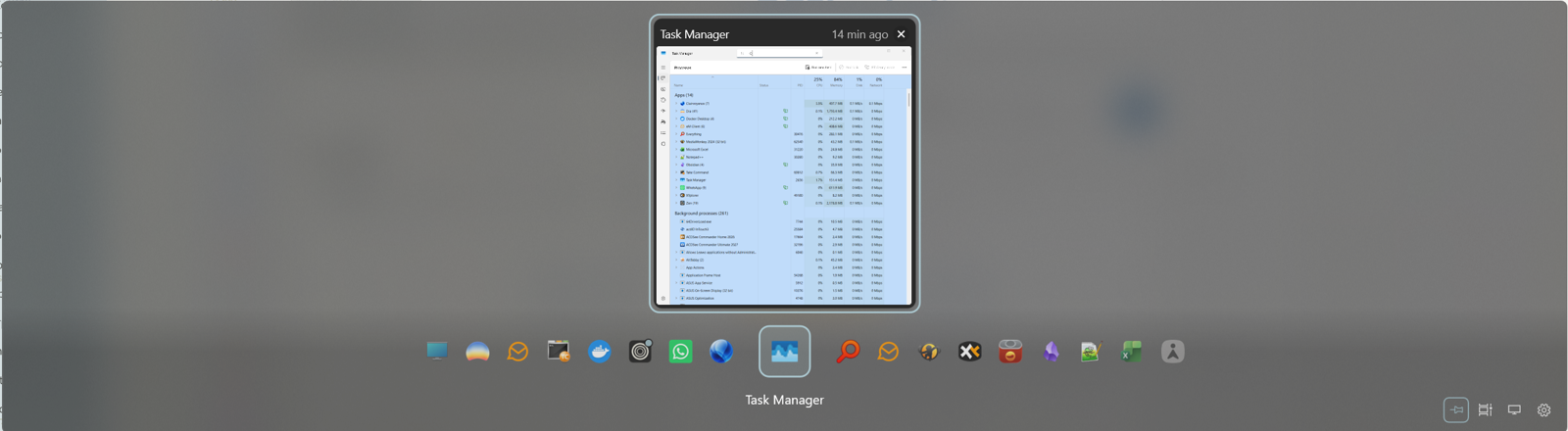
Not sure when it happened, but I'm not seeing the carousel, just the current window and icons below it.

Reply #78 Top
Quoting edzucker, reply 4147491

The 0.9 release is useless on my system. It doesn't stay on top.

End of edzucker's quote

Do you mean it closes when you release alt tab or something else?

Which mode is it set to for staying open?

Reply #79 Top
Quoting Neil, reply 4147492
Quoting edzucker, reply 4147491

The 0.9 release is useless on my system. It doesn't stay on top.

End of edzucker's quote

Do you mean it closes when you release alt tab or something else?

Which mode is it set to for staying open?

End of Neil's quote

My issue noted is basically the same. If I select "When keys are held for longer" v0.9 will disappear as soon as I try to swap apps. It's disappears so fast I'm not sure I could select another window except the next. Of course I'm holding down alt but it still switches and disappears. 

The only way I can use is by selecting "Always pinned", but I lose the ability to "quick switch".

Reply #80 Top
Quoting jacetesh, reply 4147554
Quoting Neil, reply 4147492
Quoting edzucker, reply 4147491

The 0.9 release is useless on my system. It doesn't stay on top.

End of edzucker's quote

Do you mean it closes when you release alt tab or something else?

Which mode is it set to for staying open?

End of Neil's quote

My issue noted is basically the same. If I select "When keys are held for longer" v0.9 will disappear as soon as I try to swap apps. It's disappears so fast I'm not sure I could select another window except the next. Of course I'm holding down alt but it still switches and disappears. 


The only way I can use is by selecting "Always pinned", but I lose the apply to "quick switch".

End of jacetesh's quote

I'm seeing the same. I see one window in the display, with icons below. I can use arrow keys to navigate, and then <Enter> or mouse-click on the window to select.

Reply #81 Top
Quoting KeithCollyer, reply 4147556
Quoting jacetesh, reply 4147554
Quoting Neil, reply 4147492
Quoting edzucker, reply 4147491

The 0.9 release is useless on my system. It doesn't stay on top.

End of edzucker's quote

Do you mean it closes when you release alt tab or something else?

Which mode is it set to for staying open?

End of Neil's quote

My issue noted is basically the same. If I select "When keys are held for longer" v0.9 will disappear as soon as I try to swap apps. It's disappears so fast I'm not sure I could select another window except the next. Of course I'm holding down alt but it still switches and disappears. 


The only way I can use is by selecting "Always pinned", but I lose the apply to "quick switch".

End of jacetesh's quote

I'm seeing the same. I see one window in the display, with icons below. I can use arrow keys to navigate, and then <Enter> or mouse-click on the window to select.

End of KeithCollyer's quote

That sounds different?

Could you post a screenshot of what you are seeing?

Reply #82 Top

Carousel view, Always pinned

Reply #84 Top
Quoting Neil, reply 4147352
Quoting turtlenut, reply 4147315

Appreciate the fix for pinned profile windows.  Any update on brave tab support?

End of turtlenut's quote

Brave tabs should be working the same as Chrome / Edge ones.  Just make sure you have the option enabled in Alt Tabby to show tabs and promote them to top level (if wanted)

End of Neil's quote

Still not working for me.  I have the options enabled.  I see tabs when I use Edge.  I don't see them when I use Brave (which is what I use most).  I'd attach a screenshot but I can't seem to capture one that includes the AltTabby display!   

Reply #85 Top
Quoting KeithCollyer, reply 4147588

Carousel view, Always pinned

End of KeithCollyer's quote

You need to click on the cog top right of the carousel option in the AltTabby settings and pick "Wheel continues into next app"

Reply #86 Top

Ah, I must have turned that off while trying to sort out other issues. I think I assumed it referred to the mouse wheel.

I can still only use it with "Always pinned" set. Either of the other settings just moves to the "next" window.

Reply #87 Top
Quoting KeithCollyer, reply 4147834

Ah, I must have turned that off while trying to sort out other issues. I think I assumed it referred to the mouse wheel.

I can still only use it with "Always pinned" set. Either of the other settings just moves to the "next" window.

End of KeithCollyer's quote

What country are you in?  Wondering if this is linked to keyboard layouts.