Removed

i had no choice but to remove this program, for some reason it started eating up memory and causing windows explorer to drive up cpu usage,  I had this problem with deskscaspes 11, i thought with this the problem was fixed but nope, back again, I would like to know how to fix this or please refund my money

256 views 10 replies
Reply #1 Top

Hello,

Sorry to hear you’re experiencing this issue. To help us investigate further, we’d like to suggest a quick test: if you’re using Windows 10 or 11 Pro edition, please try installing the software in Windows Sandbox. You can follow the steps here: Testing DeskScapes in Sandbox. Once done, kindly let us know the results.

Additionally, could you confirm whether you’re on Windows 10 or 11, and provide the full version details along with the OS Build number? You can obtain this information by running Winver.exe.

Thank you,

Basj,

Stardock Community  Assistant.

Reply #3 Top

Thank you, now have you tried the SandBox test? And the result?

Thank you,

Basj,

Stardock Community  Assistant

Reply #4 Top

No,  not yet, actually I don't think that is available for Windows home users

Reply #5 Top

Yes, unfortunately, the Sandbox feature only available for Windows Pro users. Next perhaps try Clean boot steps refer here to learn how: https://support.stardock.com/space/SHC/1346928700/DeskScapes+Clean+Boot. Do note that Clean boot need to be done with care. Try it and report back.

Thank you,

Basj,

Stardock Community  Assistant

Reply #6 Top

I did the clean boot, that is how I discovered it was  deskscapes causing the problems

Reply #7 Top

Hello,

I have forwarded your problem/question to Stardock Support Team for their assistance. Please keep an eye on this thread for any updates. We appreciate your feedback and patience. Thank you.

Basj,

Stardock Community  Assistant

+1 Loading…
Reply #8 Top

Hi joeshades,

Thank you for posting, and sorry to hear about the trouble.

Quoting joeshades,

i had no choice but to remove this program, for some reason it started eating up memory and causing windows explorer to drive up cpu usage,  I had this problem with deskscaspes 11, i thought with this the problem was fixed but nope, back again, I would like to know how to fix this or please refund my money

End of joeshades's quote

More details from your system Information (CPU / GPU / VRAM / etc.) may be helpful to look into this.  GPU with 8 GB VRAM for example, is recommended.  

A complete description of when exactly you start to notice issues could also help (is it consistently causing problems when running in the background, or only occasionally?  Are you noticing problems only when actively using certain features of the app?  As much information along these lines as you can provide could help for troubleshooting.

Best regards,

Adam McGuinness
Stardock Support Specialist

Reply #9 Top
Quoting Abisnabidam, reply 3995167

Hi joeshades,

Thank you for posting, and sorry to hear about the trouble.


Quoting joeshades,

i had no choice but to remove this program, for some reason it started eating up memory and causing windows explorer to drive up cpu usage,  I had this problem with deskscaspes 11, i thought with this the problem was fixed but nope, back again, I would like to know how to fix this or please refund my money

End of joeshades's quote

More details from your system Information (CPU / GPU / VRAM / etc.) may be helpful to look into this.  GPU with 8 GB VRAM for example, is recommended.  

A complete description of when exactly you start to notice issues could also help (is it consistently causing problems when running in the background, or only occasionally?  Are you noticing problems only when actively using certain features of the app?  As much information along these lines as you can provide could help for troubleshooting.

Best regards,

Adam McGuinness

Stardock Support Specialist

End of Abisnabidam's quote

I only have the integrated graphics from the 12 gen CPU, but I only use Deskscapes for pictures from my pc and i download some photos, I have used the animated part sometimes in the past and had no problems . The issue I had last year after running the program for over 2 years was memory usage started increasing to almost 100% of my 16gb, it is the same problem  I had this time, only thing that stopped it was stopping the service, I could still open deskscapes with the service stopped but could not use it to change wallpapers so  I just removed the program

Reply #10 Top

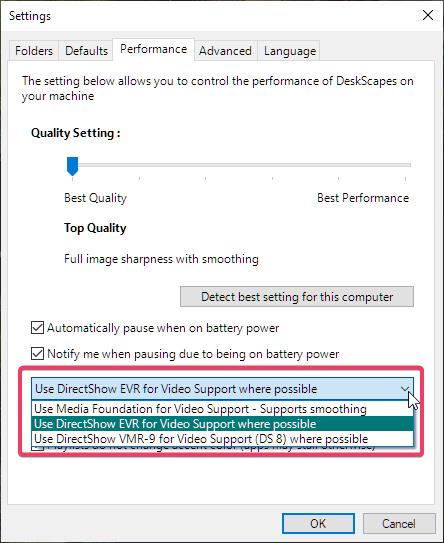
Integrated GPU might something to look at, perhaps you need to change these settings and see if any 3 could give you a better result.

Thank you,

Basj,

Stardock Community  Assistant