Start11 v2.72 Release Feedback
With the Start11 v2.72 release today, we are creating this thread so that users can report any observed issues.
Hi
I have 2 issues possibly overlapping between WBlinds and Start 11
1) Centre section of taskbar kept disappearing after mainly playing old PC games , this was mainly dissipated by customising the games settings and creating exception in Advanced settings of WB
2) Right side of taskbar recently goes completely white as attached , again tried all settings in both products to no avail
The is in latest windows 11 from 09/06/26 
I uninstalled and rebooted. Same issue.
Hi
I have 2 issues possibly overlapping between WBlinds and Start 11
1) Centre section of taskbar kept disappearing after mainly playing old PC games , this was mainly dissipated by customising the games settings and creating exception in Advanced settings of WB
2) Right side of taskbar recently goes completely white as attached , again tried all settings in both products to no avail
The is in latest windows 11 from 09/06/26
Hello,
Sorry to hear you are having issues. Have you tried restarting explorer.exe on both of your issue and see if the proper parts reappear?
If that don't help, It looks like the issue you’re experiencing is specific to your system. Could you please start a new support thread for it? That way, we can assist you more directly without mixing it into the general reporting thread, which can get confusing.
We appreciate your understanding, and we’ll do our best to help you there.
Thank you,
Basj,
Stardock Community Assistant.
It looks like the issue you’re experiencing is specific to your system. Could you please start a new support thread for it? That way, we can assist you more directly without mixing it into the general reporting thread, which can get confusing.
We appreciate your understanding, and we’ll do our best to help you there.
Thank you,
Basj,
Stardock Community Assistant
Hi Bas
Not put thru a support request b4, Please advise location of link to do so .
Have looked but seems a bit of a maze ............
More a general question.
Would it be possible to mark the current task item in a different color ?
Even better would be the last 2 used Taskitem in a different color ?
I have many Firefox windows open, jumping to e.g. to explorer or to a different Firefox window and then I need to find the last Firefox window.
Hi Bas
Not put thru a support request b4, Please advise location of link to do so .
Have looked but seems a bit of a maze ............
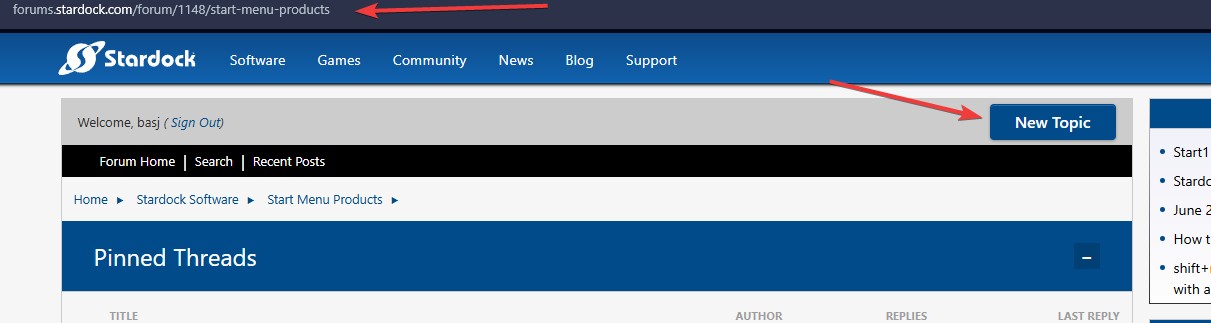
Use this link: https://forums.stardock.com/forum/1148/start-menu-products and use the "New Topic" button, to create a new thread. Refer screenshot below.

Thank you,
Basj,
Stardock Community Assistant
More a general question.
Would it be possible to mark the current task item in a different color ?
Even better would be the last 2 used Taskitem in a different color ?
I have many Firefox windows open, jumping to e.g. to explorer or to a different Firefox window and then I need to find the last Firefox window.
Hello,
From what I know there is no such features in Start11.
Thank you,
Basj,
Stardock Community Assistant.
Ive joined a lot of forums etc in 30 years but Support access and follow thru is a mystery in Stardock !
Ive logged a new support query on this question , and theres 1) no obvious access to my query location 2) no reply from yourselves !!
Please advise
Ive joined a lot of forums etc in 30 years but Support access and follow thru is a mystery in Stardock !
Ive logged a new support query on this question , and theres 1) no obvious access to my query location 2) no reply from yourselves !!
Please advise
Hello again, I have replied to your post here: https://forums.stardock.com/541875/start-11-taskbar-white-section-on-right-side/page/1#3994734. Do you have any issue to respond and continue on that thread?
Thank you,
Basj,
Stardock Community Assistant
Ive joined a lot of forums etc in 30 years but Support access and follow thru is a mystery in Stardock !
Ive logged a new support query on this question , and theres 1) no obvious access to my query location 2) no reply from yourselves !!
Please advise
Your Forum Post is here. and Basj has responded with a request for more information on the issue.
P.S. you should receive an email when someone has responded to a post for which you are subscribed. Also there will be an indication (badge) on your Watch List in the top right corner of the page.

Latest Windows update broke Start11 enhanced taskbar. No possibility to click on anything after the arrow to extend the icon tray, no notifications, no control center. Very irritating. Please correct it.
Version 25H2 (OS Build 26200.8737)
Small taskbar, centered.
EDIT: Forgot to write that I already uninstalled, rebooted, installed again the latest version of Start 11 and the problem still here
Latest Windows update broke Start11 enhanced taskbar. No possibility to click on anything after the arrow to extend the icon tray, no notifications, no control center. Very irritating. Please correct it.
Version 25H2 (OS Build 26200.8737)
Small taskbar, centered.
EDIT: Forgot to write that I already uninstalled, rebooted, installed again the latest version of Start 11 and the problem still here
Hello,
Sorry to hear you are having issues. Please try the latest build mention this post (reply#14) https://forums.stardock.com/541828/start-11-tray-icons-non-responsive/page/1#3994836. Make sure to reboot after install the update. Try and report back.
Thank you,
Basj,
Stardock Community Assistant.
Latest Windows update broke Start11 enhanced taskbar. No possibility to click on anything after the arrow to extend the icon tray, no notifications, no control center. Very irritating. Please correct it.
Version 25H2 (OS Build 26200.8737)
Small taskbar, centered.
EDIT: Forgot to write that I already uninstalled, rebooted, installed again the latest version of Start 11 and the problem still here
Hello,
Sorry to hear you are having issues. Please try the latest build mention this post (reply#14) https://forums.stardock.com/541828/start-11-tray-icons-non-responsive/page/1#3994836. Make sure to reboot after install the update. Try and report back.
Thank you,
Basj,
Stardock Community Assistant.
Thank you, in the meantime I had to uninstall the latest Windows update because I could not work like this. Without the latest update it works so it is certainly an issue with the latest Windows. I will try the link you provided later and will come back to comment
Hello all,
Start11 v2.73 beta is now available. For details, please see:
https://forums.stardock.com/541892/start11-v2-73-beta-feedback
Thank you for your time, feedback, and support.
Adam McGuinness
Stardock Support Specialist
I am experiencing a visual "seam" bug when using the Left Alignment option.
The issue behaves slightly differently depending on the style:
This visual glitch is highly distracting and prevents me from using these otherwise great styles. Could you please look into this and fix it as soon as possible?
Thank you.
OS: Windows 10 Pro 22H2
Build: 19045.7417
Start11: v2.72
Windows 7 & Modern styles screenshot:

Windows 11, Windows App, Windows Pro, & Windows Launcher styles screenshot:

Hello. the last months, with different editions of the start11 on windows 11 pro 25H2, when I am clicking on an icon at the vertical taskbar the mouse cursor jumps to the right and triggers a click on its own, see the two videos attached. By the way, I couldn't find a way to upload them directly to the forum, the link of the video will expire soon.
I am experiencing a visual "seam" bug when using the Left Alignment option.
The issue behaves slightly differently depending on the style:
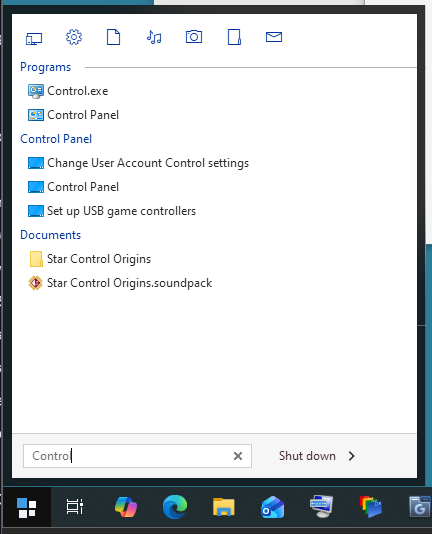
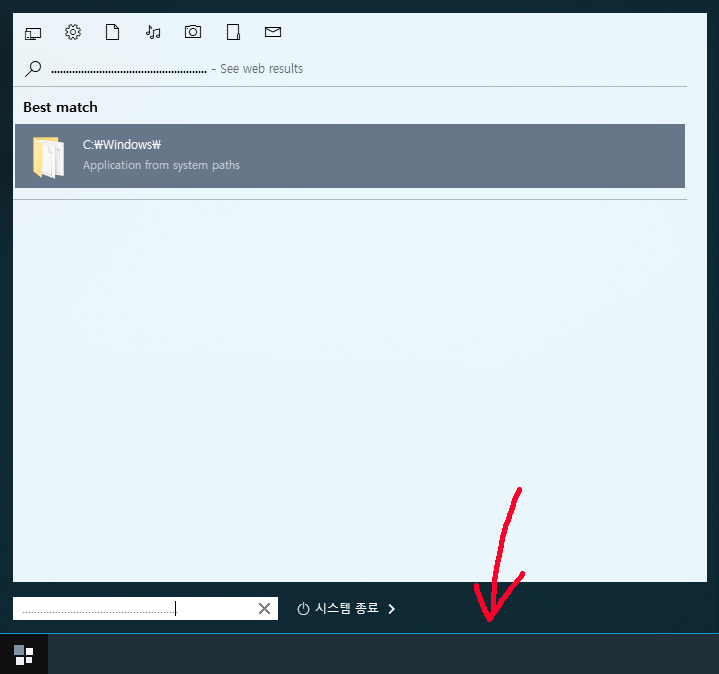
Windows 7 & Modern styles: A visible seam appears below the search bar specifically when performing a search.
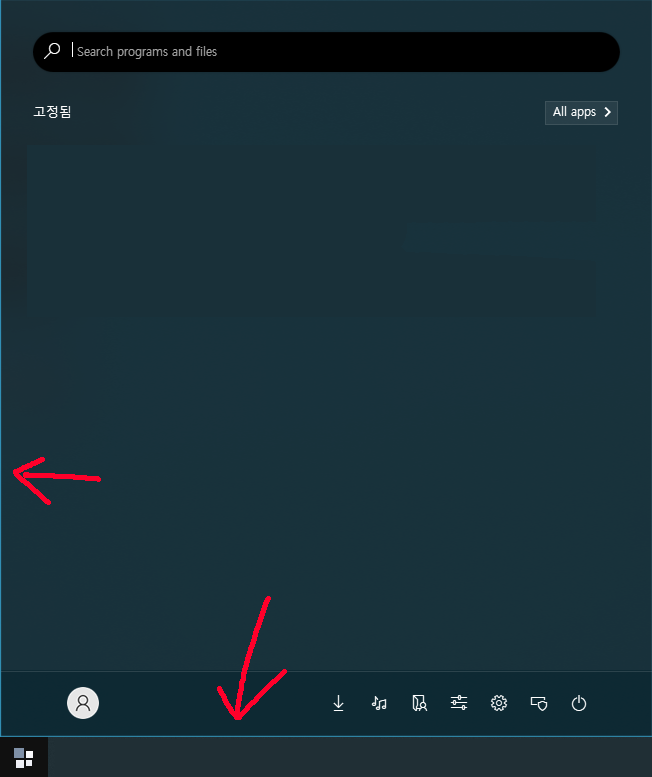
Windows 11, Windows App, Windows Pro, & Windows Launcher styles: The seam is constantly visible even without the search bar.
This visual glitch is highly distracting and prevents me from using these otherwise great styles. Could you please look into this and fix it as soon as possible?
Thank you.
OS: Windows 10 Pro 22H2
Build: 19045.7417
Start11: v2.72
Windows 7 & Modern styles screenshot:
Windows 11, Windows App, Windows Pro, & Windows Launcher styles screenshot:
Hello,
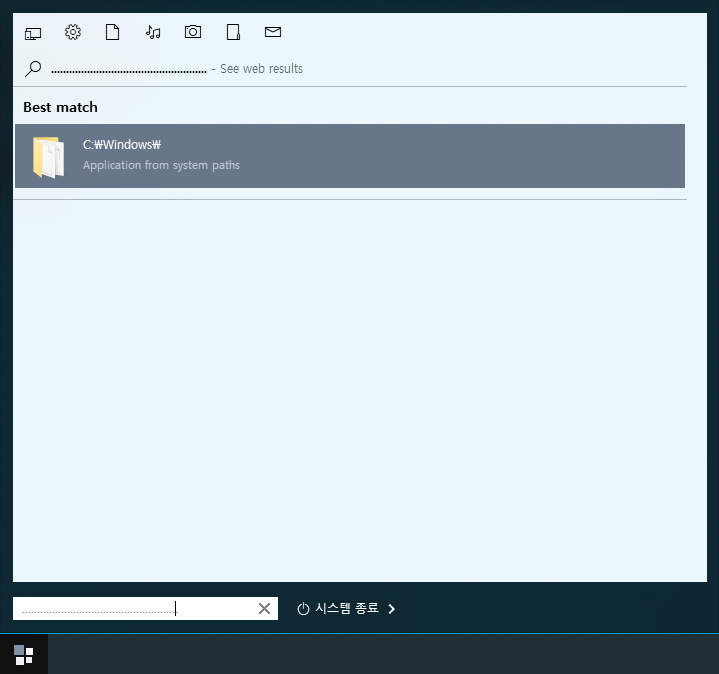
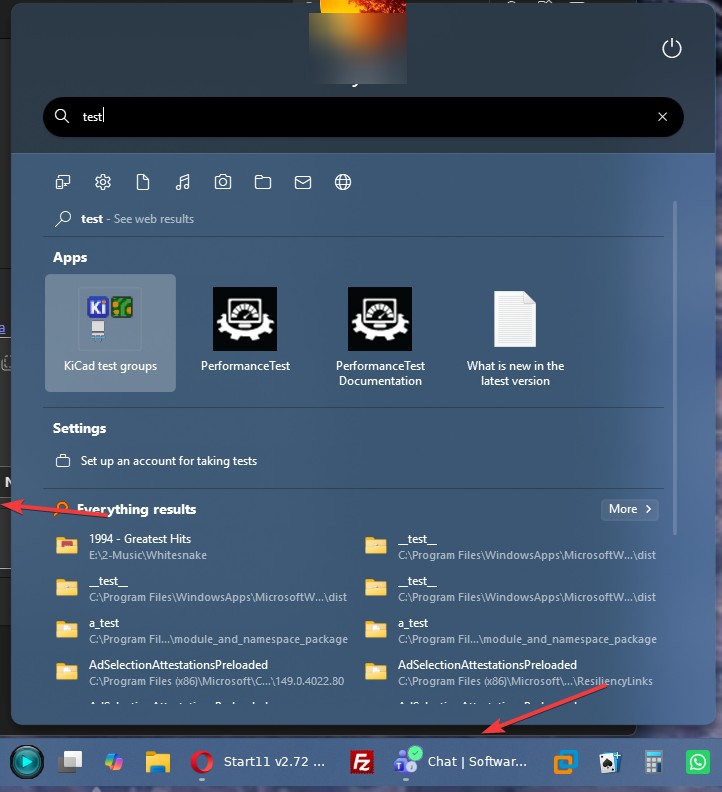
Sorry to hear you are having issues. This is what I get on my Windows 10 system. Not really sure which area you're referring to.

Thank you,
Basj,
Stardock Community Assistant.
Hello. the last months, with different editions of the start11 on windows 11 pro 25H2, when I am clicking on an icon at the vertical taskbar the mouse cursor jumps to the right and triggers a click on its own, see the two videos attached. By the way, I couldn't find a way to upload them directly to the forum, the link of the video will expire soon.
https://quickshare.samsungcloud.com/yjs1ceSn2eTX
Hello,
Sorry to hear you are having issues. Please try, uninstall Start11, reboot immediately (important), download latest version v2.73 beta available in your account product download page: https://store.stardock.com/myaccount/products. Install it, reboot immediately again. Retest it and report back.
Thank you,
Basj,
Stardock Community Assistant.

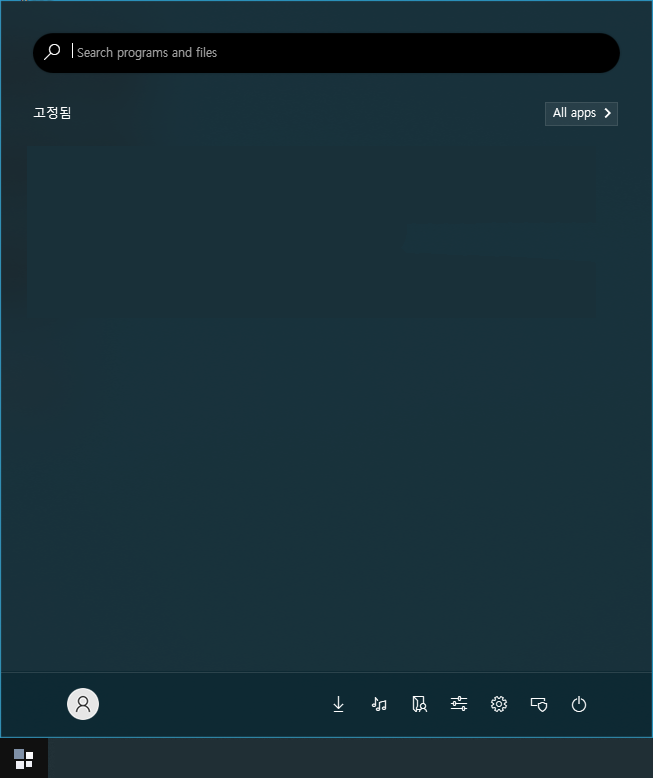
I'm referring to the seam or gap between the taskbar and the Start menu.
It might be hard to see in the attached image, so I recommend clicking on it to view it in full size.


I'm referring to the seam or gap between the taskbar and the Start menu.
It might be hard to see in the attached image, so I recommend clicking on it to view it in full size.
From what I know, those gabs does appear on any style since the Start panel is different than the taskbar. It make sense that there is gab between taskbar and the Start panel.

Thank you,
Basj,
Stardock Community Assistant
Welcome Guest! Please take the time to register with us.