
Fences 4
Shortcuts to files will not stick to Fences
I want to place a shortcut to a MS Word or Excel file in a fence. I'm able to move it there, but it will not stay. Disappears after the first restart.
Stardock will be closed for the week starting on Monday, June 29th and we will be returning on Monday, July 6th. We will be monitoring support tickets and forums during this time but expect delays in responses during this time.
Shortcuts to files will not stick to Fences
I want to place a shortcut to a MS Word or Excel file in a fence. I'm able to move it there, but it will not stay. Disappears after the first restart.
Hello,
Sorry to hear you are having issues. It is best to use Portal Fences for these files. Did you try using Portal Fences? Create a new physical folder, place your Word/Excel in there. Create a portal Fences to that file. That should solve your issue.
Thank you,
Basj,
Stardock Community Assistant.
What is Portal Fences? Is it part of Fences 4?
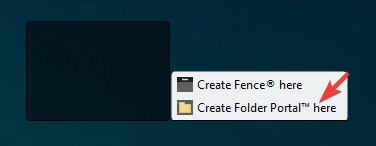
If I remember correctly Folder Portal Fences function is available in Fences 4. Try this, right click and make a rectangle on your desktop and you should see something like my screenshot below. Select "Create Folder Portal here" that should create a folder portal Fences there and you can select a folder to link it.

Thank you,
Basj,
Stardock Community Assistant
Welcome Guest! Please take the time to register with us.