Search window displacement
from  Stardock Forums
Stardock Forums
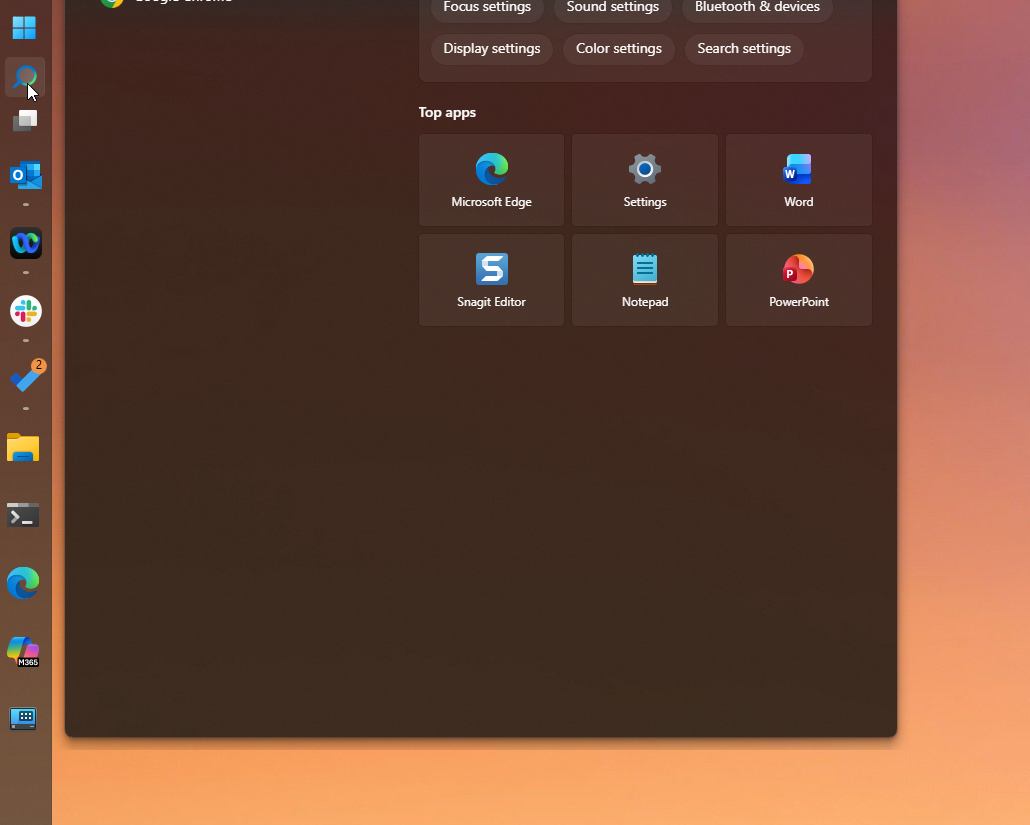
When using a vertical taskbar, the search box is displaced vertically out of frame
 Stardock Forums
When using a vertical taskbar, the search box is displaced vertically out of frame
Hello,
Sorry to hear you are having issues. I can't reproduce your issue on my system. Please try, uninstall Start11, reboot immediately (important), download latest version available in your account product download page: https://store.stardock.com/myaccount/products. Install it, reboot immediately again. Retest it and report back.
If the issue still appear, we need more information.
Thank you.
Basj,
Stardock Community Assistant.
I am also having this problem. It seemed to coincide with a Windows system update last week that changed the behaviour of the OEM start menu. None of the Start11 Start Menu style selections seem to apply themselves at all either. Reinstalling Start11 did NOT resolve the issue.
Running Window 11 version 25H2 (OS Build 26200.7840)
Start11 version 2.6
I am also running Winaero Tweaker. It is more of a passive registry editor than something that runs in the background to modify the Start Menu behaviour, but I want to be thorough...

Hello,
Sorry to hear you are having issues. Perhaps there is possibilities of incompatibility between Winaero Tweaker vs Start11, please try uninstall Winaero Tweaker, reboot and retest your issue.
Thank you,
Basj,
Stardock Community Assistant.
Removing Winaero did not fix it. In point of fact, my other computer with Start11 did not have the most recent Windows11 update, so I started it and checked. The start menu was behaving normally with Start11 and a vertical taskbar, and then I did the Windows update (to the same version as stated above) and the start menu immediately started this errant behaviour upon restart.
I think I've figure it out, you was clicking on the search icon to open up the search menu, yes? I can reproduce this one. I have forwarded your problem/question to Stardock Support Team for their assistance. Please keep an eye on this thread for any updates. We appreciate your feedback and patience. Thank you.
Basj,
Stardock Community Assistant
No, I am just clicking the start menu button (same behaviour as with the Win key on the keyboard). I have my search icon hidden. But thank you for forwarding this bug.
Actually on your first post it show your mouse pointer is on top of the search icon, so I assume, you're showing, nevermind, you are different guy than OP. So in your case, I can not reproduce it. Next steps, please do a simple Windows sandbox test refer here for instruction: https://support.stardock.com/space/SHC/1416855562/Testing+Start+in+Sandbox. Try it and report back.
Thank you,
Basj,
Stardock Community Assistant
Hi KiwsatzCA,
Thanks for reporting this. I've noticed some Search window displacement, and we now have it logged. If you can, it looks like some more information about your experience with this might also be helpful to clarify/investigate what's happening on your end.
Can you please let us know:
Internal Refence: ODNT-12103
Thanks again and best regards,
Adam McGuinness
Stardock Support Specialist
This should be addressed in the next update. Thanks for letting us know.
Sorry, I have been out of pocket for several days...
I apologize, it appears you already fixed the issue before I got back to this to report...  but also...
You guys rock!
Hello again,
This is now addressed in the latest beta release for the software.
For details on downloading the beta, listed changes, and feedback, please see:
https://forums.stardock.com/541012/start11-27-beta-feedback
Thanks again and best regards,
Adam McGuinness
Stardock Support Specialist
Welcome Guest! Please take the time to register with us.
Select a reason for giving karma:
You're about to visit an external site:
Sign up here to get the latest news, updates, and special offers delivered directly to your inbox.