Groupy 2.31 Beta Feedback

With the Groupy 2.31 beta release today, we are creating this thread so that users can report any observed issues.  

Obtaining Object Desktop Insider Builds

Object Desktop Manager

Object Desktop members can get beta and Insider builds from within Object Desktop Manager with 'Enable Object Desktop Insider builds' enabled:

image-20240219-210025.png

Stardock Download Page

Or via their download page in the ‘Object Desktop Insider’ section

image-20240219-213743.png

Obtaining Beta Releases

Stardock.com

If a beta was released, Object Desktop Members would see it in the ‘Object Desktop’ section.

Individual purchases would see it on their registration of the product under their download page.

image-20240219-214050.png

Steam

  • Right-click the Product in Steam

  • Properties

  • Betas

  • Select the beta branch at the top right (there is no password)

Example

https://cdn.stardock.us/support/uploads/steamwebhelper_2024-02-19_17-44-35.png

Reporting an issue

Please include the following for anything found:

  • Exact Windows version \ build (winver.exe)

  • Detailed steps to recreate the issue seen

  • Screenshots and videos are very helpful.  Videos can be uploaded to a cloud drive service (GoogleDrive, DropBox, OneDrive, YouTube), with a shared link included in your post.  Images can be copied and pasted directly into a post.

  • If there are specific apps that the app does not work (well) with, please note what apps and their exact versions.  If any app is not common, a link to a trial version would be appreciated.

Thank you for your interest and any time you put into making Groupy 2 a better product.

2,456 views 8 replies
Reply #1 Top

Groupy v2.31 Changelog (Released 03/25/2026)

Date

03/25/2026

Version

UI: 2.31
File Version: 2.3.1.1

Changes

  • Resolved issue with VBA editor in Excel, deleting spaces when typing

  • Added an option so you can use the old behaviour in Groupy for rules and make a rule that can match everything

  • Fixed a painting issue on tabs when in tab style and not extended tab bar height

  • Updated ARM support

Reply #2 Top

Known issues

While we appreciate all feedback, please remember that we offer no official support for beta \ preview \ developer channel versions of Windows. If you report issues while in any of those early release channels, you should not expect them to be addressed unless it still exists in a retail version of Windows.

  • tbd
Reply #3 Top

***Reserved***

Reply #4 Top

with the latest build.. i am having these problems.. not catching all the tabs.. and forgot to add that, i have to launch one chrome profile, then the group will run properly. 


https://share.zight.com/4guqYy6J

Reply #5 Top

Quoting markheninger, reply 4

with the latest build.. i am having these problems.. not catching all the tabs.. and forgot to add that, i have to launch one chrome profile, then the group will run properly. 


https://share.zight.com/4guqYy6J

1st, is this the beta or an earlier version?

2nd, its a little difficult to follow, even after watching the video; however, your issue seems to be from saved groups, yes?

If so, if you create a simple one, opens notepad and calc together, does it work as expected?

If you expand the test to include other items in the saved group, when does it fail?

What we would want if it does fail is the saved group file itself. You would have to ensure it only contains apps that you would expect us to have (Chrome, Edge, Calc, etc).  You can upload the save file to a cloud service of your choice (OneDrive, GoogleDrive, etc) and PM us \ me a shared link or paste it here in a reply.  What we would also want, but labeled appropriately, is the one that fails.  Again, however, it needs to only contain apps that you would expect us to have. 

Sean Drohan
Product Lifecycle Manager

Reply #6 Top

Hello,

I would like to suggest a few improvements for Group:

  1. Flexible tab behavior for Microsoft Office
    It would be very useful to have an option like “do not create a tab when only one document is open.” Currently, having a tab for a single file feels unnecessary and can be distracting.

  2. Compatibility with Office Tab
    At the moment, there seems to be a conflict with the Office Tab plugin. It would be great to have a setting where Group only handles duplicate/opened multiple files (e.g., Excel or Word), while single documents remain without tabs. This would allow both tools to be used comfortably together.

  3. Quick enable/disable option
    A quick way to enable or disable the program is really missing:

    • via a hotkey

    • or through a system tray icon (near Wi-Fi, volume, etc.)

  4. Compact panel mode for Office apps
    It would be great to have a compact panel with rounded corners that appears in a defined area of the screen when using Microsoft Office applications. This could:

    • save screen space

    • reduce interface clutter

    • provide quick access to tabs in a more minimalistic way


Thank you for the great app! I hope these ideas can help make it even more convenient for everyday use.

Moderator: Duplicate post removed.

Reply #7 Top

Quoting Gleb_Zemchenok, reply 6

Flexible tab behavior for Microsoft Office
It would be very useful to have an option like “do not create a tab when only one document is open.” Currently, having a tab for a single file feels unnecessary and can be distracting.

Hello,
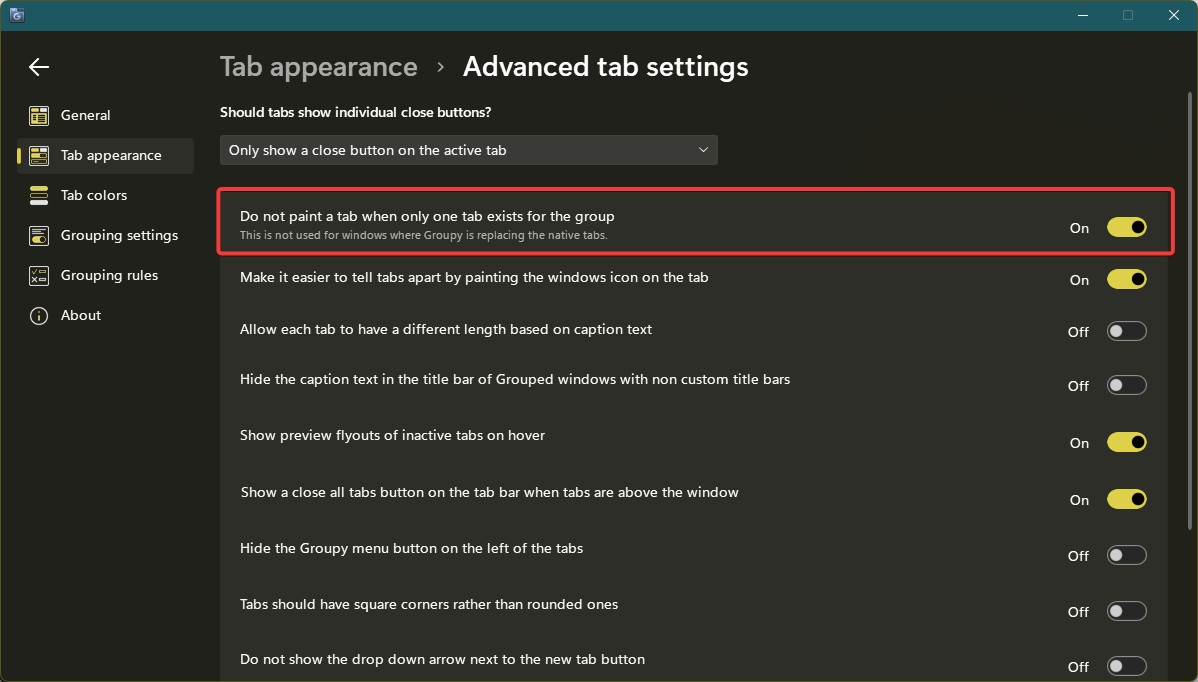
Sorry to hear you are having issues. Have you try this option?

Thank you,
Basj,
Stardock Community Assistant.

Reply #8 Top

All,

Groupy 2.31 has been released. For details, please see:

https://forums.stardock.com/541152/groupy-231-release-feedback

As always, thank you for your time, feedback, and support.

Sean Drohan
Product Lifecycle Manager