Ready for Windows 11 24H2

Stardock Software is ready for the Windows 11 24H2 release

Microsoft announced today that the company has started rolling out the long-awaited Windows 11 update that introduces some new AI features. Like many of the previous second-half releases, this includes some fundamental changes to how Windows operates.

For the past few months, Stardock has been diligently evaluating our applications like Start11 v2 and Fences 5 to make sure that they are fully functional with these changes. You may have noticed that we have been shipping more updates recently, while not always directly related to 24H2, it was part of our effort to make sure that when the new Windows release hits your device, your applications are ready.
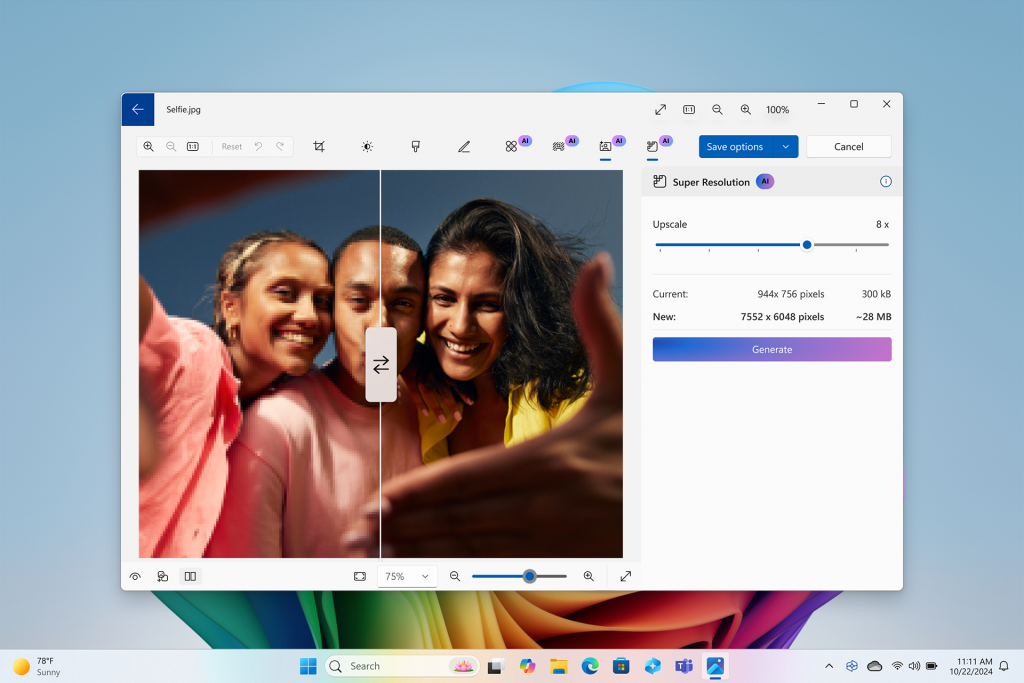
Super Resolution feature used with photo of three people

And this includes Groupy 2 as well, which has one additional fix that addresses some text clarity when used in conjunction with File Explorer – you can find this new release in the beta channel.

Microsoft has an extensive post detailing what is new but many of the updates relate to new AI features detailed below:

  • Click to Do – Microsoft’s answer to “Circle to Search”, this feature is part of snipping tool that allows you to select items in an image or text and turn it into a search query, blur backgrounds, erase objects and extract text.
  • Recall – The controversial feature that makes it easier to find what was open on your desktop will start testing with ARM-based devices this month and Intel/AMD devices next month; Microsoft is also overhauling the security and storage of this feature.
  • Photos – A new “Super resolution” feature lets you upscale any image with the power of AI.

And there is a lot more to this release than AI tools including an improved security baseline and additional improvements to the update process. While the consumer features will grab all the headlines, it's these under-the-hood updates that will continue to improve the OS to be more resilient and reliable.

Our ability to make sure our applications are ready for new builds of Windows is thanks to our community. With 24H2, we frequently run our applications through various testing flows with each Insider release, but nothing truly beats the feedback we receive from readers like you. Many of the new additions to our applications are based directly from the feedback we receive, if you haven’t joined yet, you can find us on Discord and in our forums.

62,918 views 49 replies
Reply #1 Top

Windows 11 24H2-Be very aware this major update plays serious havoc with Stardock Software. I installed 24H2. Fences Not working. Deskscapes appear in a picture frame over the black desktop screen behind it Other programs have error labels as well..I saw this and went back to 23H2. But. it did not end there. upon restoring the system, many programs did not start or open. Fortunately, I had a recent image backup. So I will BLOCK THIS UPDATE-Permanently! Any one else experienced this?

Reply #2 Top

I updated to 24h2 and Start11's start menu choices aren't working. No matter which one I select it stays the windows 11 start menu.

I saw on this forum that EP doesn't play well with Start11. I backed up my EP settings and uninstalled it. And I rebooted. 

I still have the windows 11 start menu. I'm trying to decided whether to go back to 23h2. 

Reply #3 Top

Quoting bcanz1, reply 1

Windows 11 24H2-Be very aware this major update plays serious havoc with Stardock Software. I installed 24H2. Fences Not working. Deskscapes appear in a picture frame over the black desktop screen behind it Other programs have error labels as well..I saw this and went back to 23H2. But. it did not end there. upon restoring the system, many programs did not start or open. Fortunately, I had a recent image backup. So I will BLOCK THIS UPDATE-Permanently! Any one else experienced this?

Quoting kwagraphics, reply 2

I updated to 24h2 and Start11's start menu choices aren't working. No matter which one I select it stays the windows 11 start menu.

I saw on this forum that EP doesn't play well with Start11. I backed up my EP settings and uninstalled it. And I rebooted. 

I still have the windows 11 start menu. I'm trying to decided whether to go back to 23h2. 

Hello,
Sorry to hear you are having issues. It would be best if you also include the full version number of Stardock software you having issue with. Deskscape version? Fences version? Start11 version? etc. We appreciate all your reports.

Thank you.
Basj,
Stardock Community Assistant.

Reply #4 Top

I started with Start11 2.0.3 (I think) and updated to whatever the latest version is. 

I've uninstalled Start11. I've gone back to StartAllBack and using EP with it. Even though I don't like the Windows 7 style menu it's better than Windows 11 start menu.

Reply #5 Top

BIG ERRORS

Start11 with 24H2 goes on a non stop loop reseting windows explorer.

Everytime i click or dropdown , everything on start 11 goes blank.

Im using too fences 5.84 , tried clean instalation with same failing results.

Only working is rollback the update, so clearly software is absolutely not prepared for this update.

Reply #6 Top

Quoting LLoskka, reply 5

BIG ERRORS

Start11 with 24H2 goes on a non stop loop reseting windows explorer.

Everytime i click or dropdown , everything on start 11 goes blank.

Im using too fences 5.84 , tried clean instalation with same failing results.

Only working is rollback the update, so clearly software is absolutely not prepared for this update.

Since MS hasn't published the RTM stable 24H2 Update yet, what you installed was the 24H2 Preview which is buggy and has caused problems on many systems. 

I've put off installaton of the 24H2 Final RTM release for several weeks and would advise others to do the same. The fault isn't in SD's software but rather in MS's Update Preview. As Neowin notes,

"Just keep in mind that the update is still a preview, and, as you can see from this article, there are still known issues that need fixing." - Neowin


+1 Loading…
Reply #7 Top

Quoting LLoskka, reply 5

Only working is rollback the update, so clearly software is absolutely not prepared for this update.
And you should not expect it to be. There are clearly a lot of reasons why they are named beta/insider/pre-releases and one important thing is to see what breaks or not.

+1 Loading…
Reply #8 Top

Negative, im not subscribed to any of the beta channels / Developer preview channel.

Still popped up 2 times.

But my question is if you say you have it working ready for it , and theoretically you must have it tested, why is not .


Anyways ill wait to have a working versión of start 11.


Thanks Anyway.

Reply #9 Top

Please also share your Windows full version and OS Build number. Please use Winver.exe to get to those numbers.

Thank you,

Basj,
Stardock Community Assistant

Reply #11 Top

Edition Windows 11 Pro

Version 24H2

Installed on ‎10/‎2/‎2024

OS build 26100.1882

Experience Windows Feature Experience Pack 1000.26100.23.0

For the record I never thought the problem was with Start11...exactly. I figured Windows was stopping Start11 from working and that it might be able to be addressed in a future update. I really don't understand why Windows is so opposed to 3rd party software "fixing" Windows to be what we NEED it to be. The Windows 11 start menu is just awful. I actually use the start menu! Many times a day. I miss my Windows 10 style menu.

I'm still debating going back to 23h2. I have a few days to see if I can stand Windows 24h2 and the Windows 7 style start menu I'm now using. I know 24h2 will be forced on me eventually. 

Reply #12 Top

Quoting kwagraphics, reply 11

Edition Windows 11 Pro

Version 24H2

Installed on ‎10/‎2/‎2024

OS build 26100.1882

Experience Windows Feature Experience Pack 1000.26100.23.0

I just got my system updated to Win11 24H2 (OS Build 26100.1742) but I don't have issue with Start11v2.11 on it. Refer screenshot below. Please try reinstall Start11v2. Reboot immediately after installation is done. Retest and report back.

Thank you,

Basj,
Stardock Community Assistant

Reply #13 Top

Quoting bcanz1, reply 1

Windows 11 24H2-Be very aware this major update plays serious havoc with Stardock Software. I installed 24H2. Fences Not working. Deskscapes appear in a picture frame over the black desktop screen behind it Other programs have error labels as well..I saw this and went back to 23H2. But. it did not end there. upon restoring the system, many programs did not start or open. Fortunately, I had a recent image backup. So I will BLOCK THIS UPDATE-Permanently! Any one else experienced this?

I did a short test Fences v5.84 and Deskscapes v11.02 on my Win11 24H2 (OS Build 26100.1742) and both look it working as normal. Need to know your Fences and Deskscapes version please. And screenshow on Deskscapes issue would help us understand the issue better.

Thank you,

Basj,
Stardock Community Assistant

Reply #14 Top

I just wanted to add that I noticed today after upgrading to Windows 11 Pro 24H2 that my start buttons were compressed in size.  I own Object Desktop and have used the suite of programs for many years.  I'm very familiar with the options, so I went through to make sure nothing was wrong.  There wasn't anything in the settings that was wrong on my end.  In this case I am specifically referring to both Start 11 and WindowBlinds.

I want to include screenshots to my post, but unfortunately I am unsure of how to upload an image.  I see where you can attach an image from within the menu, but where it says source I am unable (or unsure) of how to put my screenshots in.   My hopes are to put in a screenshot of how it's supposed to look vs how it's showing up post 24H2 upgrade.

Just FYI, I have tried this across the board regarding multiple WindowBlind themes from multiple creators, and over multiple years.  All of the results are the same; the start buttons are compressed in size.

And since it was asked of others my OS and Build Number is Windows 11 Pro 24H2 OS Build:26100.1882 

Also, please let me know how to actually upload images or attach the files of my screenshots so you can see what I'm talking about.

Thanks.


Reply #15 Top

Quoting Digicoma, reply 14

Also, please let me know how to actually upload images or attach the files of my screenshots so you can see what I'm talking about.

Use one of these icons to upload image in your forum post here.

Thank you,

Basj,
Stardock Community Assistant

Reply #16 Top

I uninstalled Explorer Patcher. I installed Start11, rebooted and took this screen shot...

No joy.

Reply #17 Top

Quoting kwagraphics, reply 16

I uninstalled Explorer Patcher. I installed Start11, rebooted and took this screen shot...

Something else might be blocking Start11, have you tried updating the drives as mentioned by Doc in reply#10?

Thank you,

Basj,
Stardock Community Assistant

Reply #18 Top

I have the latest drivers. I'm very diligent about that. After every update I check for new drivers and I always back up the current drivers, just incase there's an issue and I need to go back to a previous version.

Thanks for your help.

Just a little fyi. I was using StartAllBack because there's a setting on the start menu screen, "use enhanced classic start menu", that I turned off. With Explorer Patcher I was able to use a Windows 10 style start menu. I've been happy with that.

But that doesn't work either after the 24h2 update. SAB does give me a windows 7 style start menu. I'm just not happy with it. 

Reply #19 Top

Quoting kwagraphics, reply 18

I have the latest drivers. I'm very diligent about that. After every update I check for new drivers and I always back up the current drivers, just incase there's an issue and I need to go back to a previous version.

Thanks for your help.

Just a little fyi. I was using StartAllBack because there's a setting on the start menu screen, "use enhanced classic start menu", that I turned off. With Explorer Patcher I was able to use a Windows 10 style start menu. I've been happy with that.

But that doesn't work either after the 24h2 update. SAB does give me a windows 7 style start menu. I'm just not happy with it. 

Just as a test, please try test it inside Windows Sandbox: https://forums.stardock.com/505872/start11-support-faq#windowssandbox. Try it and report back.

Note: I just updated my Windows 11 24H2 (OS Build 26100.1882) and I still don't see the issue. As a reference, I am running without StartAllBack and ExplorerPatcher, for I don't really think these application compatible with Start11 as all of them change how Explorer/StartMenu/taskbar work.

Thank you,

Basj,
Stardock Community Assistant

Reply #20 Top

Quoting kwagraphics, reply 18

I was using StartAllBack

Is SAB still on your machine?

Quoting basj, reply 17

Something else might be blocking Start11, have you tried updating the drivers as mentioned by Doc in reply#10?

I'm not convinced just yet that all Intel drivers (even if assiduously updated) will work seamlessly with 24H2. Not enough time has gone by to get all the public reporting sorted.

I would however simplify as much as possible by eliminating customizing software other than SD's from your machine. SAB/EP might well not have been fixed for 24H2.

+1 Loading…
Reply #21 Top

I uninstalled StartAllBack and Explorer Patcher before installing Start11. I am smart enough to know having 3 different programs trying to modify the start menu is going to cause problems. I even rebooted before installing Start11 as SAB required it after the uninstall.

I haven't gone through all the things I did. I don't even remember it all. But I do know I uninstalled Start 11 and reinstalled it. I uninstalled it again and downloaded it (since it was originally 2.0.3 with an update). I even tried it as a 30-day trial.

Reply #22 Top

Start 11 v2 is working perfectly fine for me on 24h2. I have tested it on both the latest release channel and even the dev channel without issue.

+1 Loading…
Reply #23 Top

Well fuck it then, were are reporting it because we have so much free time right?

My Windows is 11 Pro 24H2 OS 26100 1882 as other users and my fences v5.84 & start 11 v2.11 ( using w10 style menu )

Surely there must be a dump file or anything preveting it to load properly.

Already tried clean uninstall with revo, rebooted and new installations with same error.

PS: all drivers are up to date ( including newest amd adrenalin with AFMF 2 support )

Reply #24 Top

Okay... here it is from the top. I didn't really want to mention SAB and EP on a competitors forum, but it seemed more important to do so.

I was using SAB with EP. In SAB's start menu section you can turn off "use enhanced classic start menu". I tried it because I don't like the Win 7 style start menu. Turning this setting off gave me a Win 10 start menu through Explorer Patcher's settings. All the other settings in SAB were available. After the update to 24h2 this didn't work anymore. I had the fugly Windows 11 start menu. When I turned on the enhanced classic start menu setting I had a Windows 7 style menu. Which I didn't really want. 

I decided to try Start11 again. I uninstalled both SAB and EP. I had version 2.0.3. It didn't work and I got the latest update. It didn't work. I uninstalled them and downloaded the latest version and it didn't work. And yes, there were many reboots. And for no apparent reason other than I have nothing better to do, I even tried it as a trial. I had an issue with Start 11 not liking my license number with v1 many moons ago. So there it is.

I have uninstalled Start11 for now and I'm back using SAB and the Win 7 style start menu. I haven't reinstalled EP. I probably will at some point.

Edit: I thought I'd look at Windows Event viewer and I found more than one instance of this:


And there are similar events for SAB. Maybe this will mean something to someone out there.

Reply #25 Top

kwagraphics and LLkoskaa, could you run winver and post your machine stats? Also, I wouldn't reinstall SAB nor EP.

Have you rolled back 24H2?