NOW AVAILABLE: Object Desktop 2019 and Exclusive DeskScapes 10 Beta

Object Desktop members get to try the new DeskScapes before it releases

Object Desktop 2019 is here
Object Desktop is a powerful suite of desktop enhancements that transforms your Windows
experience. It’s like getting the next version of Windows today.

Object Desktop owners are the first to test beta versions of software before
they’re ever released and you get free updates to all Object Desktop applications.

What’s Coming in Object Desktop 2019:

  • Brand New Applications, starting with DeskScapes 10, which will let you completely personalize your desktop wallpaper with animations, pictures, and video.
  • New Object Desktop Manager, (coming soon) with a sleek new look, making it easier to access betas and install, update, and manage your applications.
  • Major Updates to your favorite Object Desktop applications.

Renew Object Desktop
Reg. Price: $49.99
Renewal Price: $19.99
Special Discount Price: $14.99*

Upgrade to Object Desktop
Reg. Price: $49.99
Upgrade Price: $24.99
Special Discount Price: $14.99*

Get Object Desktop
Reg. Price: $49.99
Sale Price: $29.99
Special Discount Price: $19.99* 


Try the DeskScapes 10 Beta Now
Stardock is pleased to announce a major new version of DeskScapes
Personalize your desktop wallpaper with animations, pictures and video.

The new version includes updates based on customer feedback such as:

  • A new wallpaper manager, complete with the ability to mark “favorite” backgrounds, as well as modifying and saving both static and animated wallpapers.
  • Seamless WinCustomize library integration allows direct browsing and downloading of backgrounds from within the application.
  • Comes in light and dark theme modes to suit your personal tastes.
  • Supports h264 videos with hardware accelerated decoding where possible.
  • New additional effects you can apply to static and animated wallpapers which can now easily be combined and ordered.


The DeskScapes UI has had a complete overhaul

As well as the obvious dark / light mode, the interface now splits the list in to folders allowing improved management of your backgrounds.
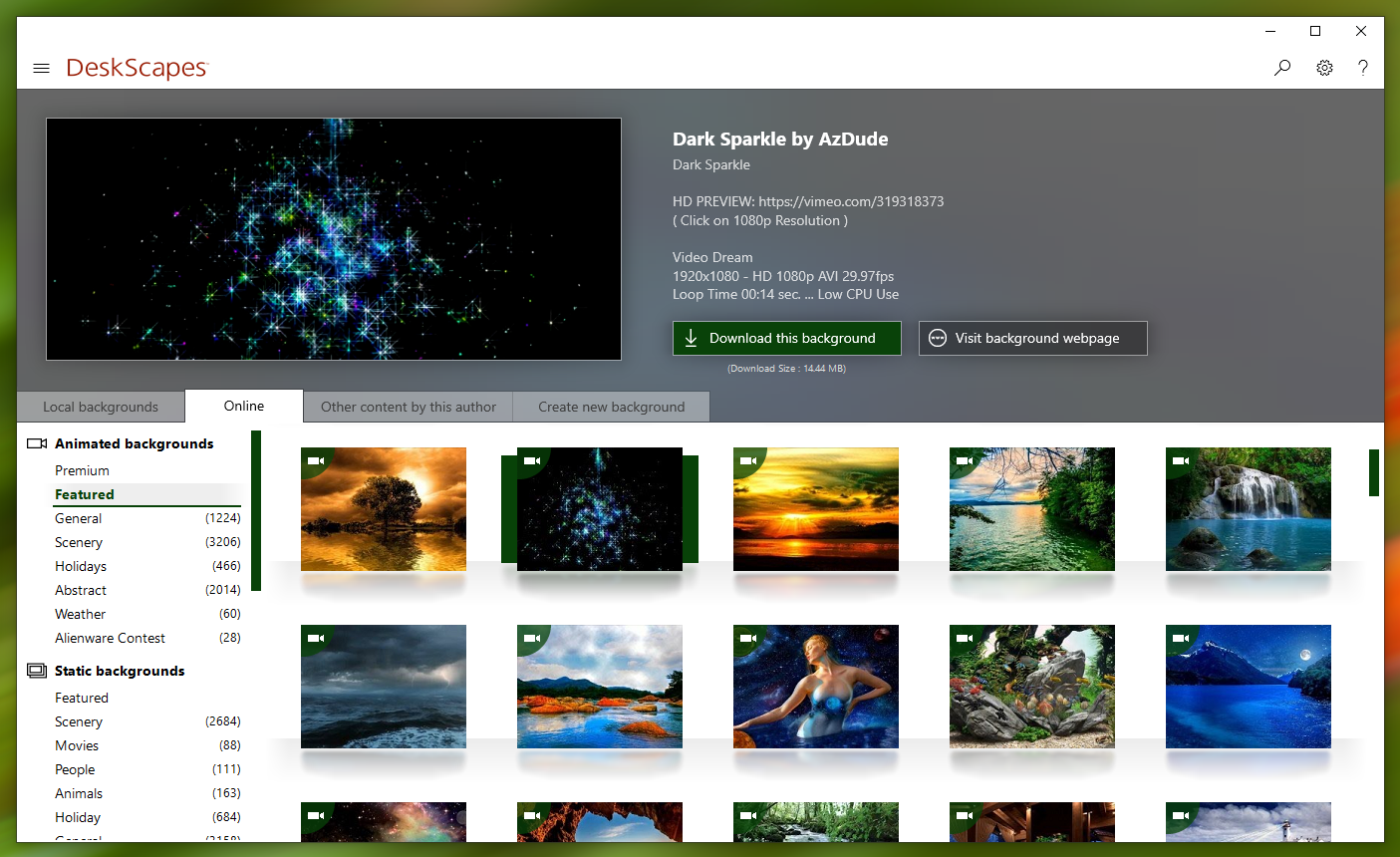
 

DeskScapes now allows you to browse the WinCustomize library directly from the app

Directly browsing the WinCustomize library from within the application puts new backgrounds a click away and offers greater exposure of new Deskscapes and wallpaper backgrounds to other users.


Apply effects and now apply more than one at once

If you've ever found yourself loading up an image into a photo editing app to tweak it to make for a better desktop background, look no further than DeskScapes 10.  The beta includes over 60 effects, along with the ability to combine multiple effects to give users the ability to turn pretty much any image or video file into a usable desktop background.


DeskScapes 10 beta is available for Object Desktop subscribers today.
A stand-alone version is expected to be released this Spring.

Renew Object Desktop
Reg. Price: $49.99
Renewal Price: $19.99
Special Price: $14.99*

Upgrade to Object Desktop
Reg. Price: $49.99
Upgrade Price: $24.99
Special Price: $14.99*

Get Object Desktop
Reg. Price: $49.99
Sale Price: $29.99
Special Price: $19.99* 

Visit www.objectdesktop.com to learn more.


*Sale ends 3/26/2019 at 1PM ET.

59,068 views 31 replies
Reply #2 Top

Lovin it.  Working great here.  Just one CTD after constantly changing Dreams and WB themes.  Reboot fixed it.

Reply #3 Top

Is there some reason Dream Maker can't be reworked to accept 200 megabytes? Some of the Dreams I 'd like to make for personal use are over the present 150. I cut and cut and loose the effect of the dream.

Thanks

Reply #4 Top

Quoting S, reply 3

Is there some reason Dream Maker can't be reworked to accept 200 megabytes? Some of the Dreams I 'd like to make for personal use are over the present 150. I cut and cut and loose the effect of the dream.

Thanks

You can run a WMV format video  in Deskscapes on your desktop .

Actually in the new Deskscapes 10 you can click on the Local tab

and then click on videos ( in the video folder )

and you could play your Dream video

on your desktop like a dream .

Reply #5 Top

Thanks AzDude. I will do this when Deskcapes 10 comes out of beta. Had trouble with 10.

I appreciate your response.

Reply #6 Top

One more thing. Should Deskscpes 8 be totally removed before installing 10?

Reply #7 Top

Quoting S, reply 6

One more thing. Should Deskscpes 8 be totally removed before installing 10?

You can install DS10 over DS8 then Reboot 

Reply #8 Top
Quoting Neil Banfield,

If you use the disable Deskscapes option it will reset your desktop to whatever it was set to before Deskscapes was enabled.  This is stored in the oldwall registry key.
------------------------------------------------------------------------------------------------------------------------


Does not work.

I have done several uninstalls, with purge and reinstalls. Just does not work

I don't know how many more activations I have left to keep doing this

Reply #9 Top

Quoting S, reply 8

Quoting Neil Banfield,


If you use the disable Deskscapes option it will reset your desktop to whatever it was set to before Deskscapes was enabled.  This is stored in the oldwall registry key.


------------------------------------------------------------------------------------------------------------------------


Does not work.

I have done several uninstalls, with purge and reinstalls. Just does not work

I don't know how many more activations I have left to keep doing this

When I reboot the desktop is blank. No previous pic. This never happened with DS 8

Reply #10 Top

Quoting S, reply 8

I don't know how many more activations I have left to keep doing this
Deactivate it before you uninstall and you won't run out of activations.

Reply #11 Top

Quoting S, reply 8

I have done several uninstalls, with purge and reinstalls. Just does not work

I don't know how many more activations I have left to keep doing this

use this link here https://forums.stardock.com/486311/accounts-and-activation-support-faq#deactivateproduct


Reply #14 Top

The only account I have is that I'm the administrator. Do I really need to create another account?

Reply #15 Top

Quoting S, reply 14

The only account I have is that I'm the administrator. Do I really need to create another account?

Follow the guidelines in the link as what you should do , please.

Reply #16 Top

Thanks for all your help. I give up. Nothing should be this difficult.

Back to DS 8

Reply #17 Top

I tried this beta but to some extent it is a step backwards I like to have all my wallpapers and dreams to be random but with this version I have to add each file individually to the random folder which is extremely tedious when yo have 1000+ wallpapers at least with the last version you could "select all" 

Reply #18 Top

oldwall works great on Descapes 8, does not work on DS 10. ? Is there a registry fix fro that?

Otherwise I have NO problems with DS 10

Reply #19 Top

Quoting S, reply 18

oldwall works great on Descapes 8, does not work on DS 10. ? Is there a registry fix fro that?

Otherwise I have NO problems with DS 10

I don't know oldwall , give me a link here to get to it 

and i'll check it out .

Reply #20 Top

It is installed in the registry only. below is for DS 10

[HKEY_USERS\S-1-5-21-48017900-2978218137-927987745-1000\Software\Stardock\Deskscapes]
"OldWall"="C:\\Users\\my name\\AppData\\Local\\Stardock" 


Reply #21 Top

Quoting S, reply 20

It is installed in the registry only. below is for DS 10

[HKEY_USERS\S-1-5-21-48017900-2978218137-927987745-1000\Software\Stardock\Deskscapes]
"OldWall"="C:\\Users\\my name\\AppData\\Local\\Stardock" 


I'm not really clear what your saying ,

are you saying "oldwall" is a dream that works in DS8 but not in DS10 ?

if so that link above is not a link to the actual dream .

That link line you show does not show for me .

Leave a video capture here to show your issue...

Reply #22 Top

When I disable DS10 oldwall in the registry is supposed to return your desktop jpg as it was before you started DS 10.

When I disable DS 10 My desktop has NO previous jpg (picture). All I get is a blank white desktop.

The oldwall is a registry entry so when you disable DS 10 is supposed to return the desktop to it's previous state

Again oldwall is in the registry only

Reply #23 Top

Hello,

I have forwarded your report to the Stardock support team for their review and recommendations.

Please keep an eye on this thread for any updates.

We really do appreciate your feedback, thanks.

AzDude
Stardock Community Assistant

Reply #24 Top

Thanks. AZDude.  I'll keep watching. BTW..I'll keep using DS 10beta with it's flaws, or it just could be me. Hope DS 10 will be better out of beta.

Also, Love your Dreams!

Reply #25 Top

Quoting Aids, reply 17

I tried this beta but to some extent it is a step backwards I like to have all my wallpapers and dreams to be random but with this version I have to add each file individually to the random folder which is extremely tedious when yo have 1000+ wallpapers at least with the last version you could "select all" 

A decent observation - have logged it internally - ty.

Internal ref: 205815

----------------
Sean Drohan
Stardock Customer Service Manager
