How Leopard Demolishes Vista

Apple's Microsoft-Devouring Jungle Cat

http://www.slate.com/id/2177073/nav/tap3/

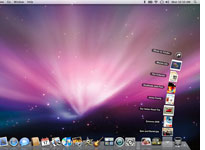
The Stacks feature in Apple's OS X Leopard Steve Jobs may be the undisputed grand master of technology hype, but when it comes to numbering operating systems, he's oddly self-effacing. With Leopard, the new version of OS X, Apple has nudged the version number forward from 10.4 to 10.5.

Most companies would assign such a teensy increment to

an update with a few minor bug fixes, but Leopard includes more than 300 new features by Apple's

count. Even after you weed out several dozen pieces of ephemera such as Kerberized NFS—if you don't

know what that is, you'll never need it—the $129 Leopard is a big deal with plenty of meaningful

enhancements over its predecessor Tiger.


Apple is smart to underpromise and overdeliver. Its approach stands in contrast to that of Microsoft,

which trumpets each new version of Windows as an epochal breakthrough, thereby raising expectations

so high that it can't possibly meet them. Windows Vista, for instance, has been saddled with the slogan

"The Wow Starts Now" and an ad campaign that claims the OS leaves users speechless with

wonderment. It turns out that "wonderment" isn't quite the emotion that Vista has evoked. Nine months

after Microsoft's new operating system reached consumers, it's been forced to reassure customers that

they'll be able to order new machines that run Windows XP, not Vista, well into the foreseeable future.


It's easy to understand why many PC users are clutching onto the six-year-old XP. The new version of

Windows is rife with new features that are half upside, half downside. The 3D Aero user interface is slick

and modern … but it's such a resource pig that the $1,000 PC I bought after Vista shipped can't run it

reliably. On the security front, a feature called User Access Control can help keep you safe from

hackers … but its in-your-face nag notes are so irritating that it's tempting to turn the whole thing off

and take your chances. Vista offers better technical underpinnings than XP for sophisticated

applications yet to come … but many existing programs and add-ons won't ever work with it.... see full article 

3,222 views 25 replies
Reply #1 Top

For the most part I agree with what you said.  However, I disagree on intent.  OSX was called OSX because of Unix.  But then they decided to get cute about it (because of Win2k instead of Win5), and tried (and are trying) to convince everyone that OSX stands for OS 10 (and the reason they released OS9 when that was really only OS8.x).

If he was to call tiger, leopard, and any other cat what it really is OS 11, 12, 13, then it could not be OSX, and thus the whole PR campaign would be laid bare as (for once) just an attempt to out gimmick MS.

Reply #2 Top
wow Guy...thx for the 'background'...facinating how product rollout campaigns are addressed + packaged...
Reply #3 Top
The one thing i find staggering is the software that gets bundled with the macs compared to pc's when i compare a imac all in one G3 from 2000 with OSX 10.2 to my pc S5020AN 2003/2004 with xp,dam! it makes me think what the hell ms doing..lol.. (i was given a imac G3 near the beginning of the year i liked it so much i bought another in case of failure since they're not worth repairing due to the cost,makes me wish i had become a service technician)
Reply #5 Top
I read this over at Softpedia (the title drew/sucked me in) and I could not disagree more....Leopard no more demolishes Vista than I do Parliament House in Canberra.

It's an OS for crike's sake, as is Vista, and is no more revolutionary than Vista, tho Mr Smug would have us believe otherwise.
Reply #6 Top
Funny that the next paragraph says...

Leopard isn't all cheery news. Some early adopters report Microsoftian-sounding installation meltdowns involving a blue screen of death, for instance. Paul Boutin's advice back in January, to hold off on buying a new OS until the first round of fixes has been released, is equally sensible here. But Apple's upgrade is far closer to unalloyed goodness than Microsoft's. For years, I've been urging friends, relatives, and acquaintances who ask me for computer-shopping advice to consider Macs as well as Windows machines. Leopard is a classy, coherent upgrade that makes the Mac alternative that much more compelling.

Microsoftian? Now that's some unbiased journalism there.   
Reply #7 Top
Both Windows and Mac OS X have three version identifiers.

They have a code name, a brand name, and a real version number.

Windows XP's and Vista's code names were "Whistler" and "Longhorn" respectively, their version numbers are 5.1 and 6.0. You get the version numbers by typing "ver" in a command line. If you have Interix installed, you can also do a "uname -a":


Windows xerxes-vista 6.0 SP0 x86 Intel_x86_Family6_Model15_Stepping6


Tiger's and Leopard's brand names are "Mac OS X 10.4" and "Mac OS X 10.5". Their version numbers are 8.x (don't know what the latest Tiger was) and 9.0 (10.5.1 is 9.1). You get those version numbers by typing "uname -a" in a command line:


Darwin xerxes 9.1.0 Darwin Kernel Version 9.1.0: Wed Oct 31 17:46:22 PDT 2007; root:xnu-1228.0.2~1/RELEASE_I386 i386


(Note that the above are the same machine with Vista running in Parallels. Xerxes is my Intel Mac.)

Windows' version numbers go back to (16 Bit) Windows 1.0 with (32 Bit) Windows NT starting at 3.0 (development) and 3.1 (public release).

Mac OS X' version numbers go back to (68k) NEXTSTEP 1.0 with OPENSTEP being version 4.x and Mac OS X Server in 1998 being the first 5.x release. OS X 10.0 and 10.1 were 5.x, 10.2 was 6.x, 10.3 was 7.x, 10.4 was 8.x, and 10.5 is 9.x.

Mac OS X 10.0 and 10.1 would give you a version number like 1.4.1 instead of 5.4.1 because Darwin (kernel and base OS) carried different version numbers back then for a few years. But Mac OS X then reverted to the original scheme in 2002 or so.

Windows NT 3.1 and Windows 3.1: 3.1
Windows NT 3.5: 3.5
Windows NT 4 and Windows 95: 4.0
Windows 98: 4.1
Windows ME: 4.9
Windows 2000: 5.0
Windows XP: 5.1
Windows Server 2003: 5.2
Windows Vista: 6.0

Windows CE has different version numbers again, but Microsoft are trying to keep "Windows Mobile" in the same range as Windows NT/2000/XP/Vista: 5.0 two years ago and 6.0 now.
Reply #8 Top
Looks like another Mac owner trying to justify buying it.
Reply #9 Top
Or a Windows user justifying buying it...
Reply #10 Top
Its a case of pc envy
Reply #11 Top
I just don't know how to respond except to say I disagree.Extreemly happy with vista
End of quote


Couldn't agree more.

I never liked OS X, tried many versions and I didn't seem to enjoy any of them. Windows does all the things and more that I need when compared with OS X.

Yeah yeah, EA games is making titles for OS X. But for how long? They've had a nice big hit on quarterly sales, becides the fact that most of their games for PC are crap. I'm not talking about ones they produce like Crysis, im talking about their sports titles which haven't had a graphics update in 3 years. Even if they do smarten up thats one company among hundreds that has very low expectations from your average gamer.
Reply #12 Top
How do you "try" many versions? Do you or do you not have a Mac?

I use Mac OS X at home and Windows Vista at work. I really prefer Mac OS X, although (or perhaps because) I spend more time in Vista.

Pet peeves:

Windows Vista programs steal the focus. When I launch a program and it takes a while to load, and I switch to another program, in Windows Vista the launched program will at some point steal focus and interrupt my typing. In Mac OS X, the launched program will simply appear behind the current window.

I cannot easily select specific text in Windows Vista. For some reason Windows always decides that I must select more or less than I am trying to select. (Try selecting the phrase "another pr" in the paragraph above and you will see what I mean.) Also, double-clicking a word in Mac OS X will select the word and nothing but the word. That is very clean. In Windows, it will select the word and the space behind it, unless there is no space behind the word. Hence what I will have in the clipboard might or might not have a space and I have to check when I paste it somewhere. This is particularly annoying when copying and pasting passwords, because you cannot see them when you paste them.

The system settings in Mac OS X are all in one place and I can easily tell where they are (Apple menu, System Preferences). They also have simple names. In Windows Vista, everything takes a few clicks more and I cannot remember which settings applet is for what and why some are in the control panel while others are in the "Personalize" sub-folder in the control panel. (The disctinction does not appear to be system-wide vs. per-user, as PDA syncing is in the control panel with parental controls and "Add Hardware" while "Personalize" contains only per-user settings.)

The command line window in Windows does not allow for easy copying and pasting of text and if you do copy and paste, it does not recognize a command line as a line of text to be copied:


C:\Documents and Settings\Andrew Brehm>very long command line that I ty
ped to show what is going on
'very' is not recognized as an internal or external command,
operable program or batch file.

C:\Documents and Settings\Andrew Brehm>


(This is from XP but Vista behaves exactly like it.)

Mac OS X recognizes "very long command line that I typed to show what is going on" as a line of text and copies it as such.

Everything is implemented cleaner in Mac OS X. It is a lot easier to describe where to change a certain setting. Windows Vista is just more difficult to use.

And this is just the things that could easily be changed. Windows has a few deep usability problems that cannot be fixed easily any more. For example Mac OS X uses a key combination for "copy" (Apple-c) that is not the same as the key combination for "break" in a terminal (ctrl-c). Hence copying and pasting in Mac OS X's command line works just as in any other program. Try copying and pasting between a GUI program and an editor running in command line window!

Mac OS X's terminal understands all common control codes (ctrl-c for break or cancel, ctrl-d for end of transmission/file, ctrl-z for suspend, ctrl-a for navigating to beginning of line, ctrl-e for navigating to end of line, ctrl-k for removing text, ctrl-y for putting it back), most of which are also understood by all Cocoa (but not Carbon) programs. Windows has no such consistency. In Mac OS X I can copy and paste between Emacs and a native Cocoa program using the same keyboard shortcuts, in Windows I cannot, unless I use a nativ Win32 GUI port of Emacs.

Mac OS X also doesn't keep displaying idiotic messages that I don't want to read again and again and keep dismissing. It's just cleaner and less annoying.

Mac OS X simply doesn't do a lot. It stays away from me. It doesn't do much that annoys me. Whenever there is something where a solution that I don't like would annoy me, OS X simply doesn't have a solution. Like I might _want_ the OS to try to predict what I am trying to select. But Windows does it wrong. That's annoying. OS X doesn't try to predict. That is better. It cannot possibly annoy me.

I have just tried out RISC OS (native OS for ARM CPUs) and it is even cleaner than Mac OS X, or so it seems. Very non-annoying, better than OS X. But both don't compare to Windows when it comes to annoying features.

Clicks to change screen resolution:

Mac OS X: 4
RISC OS: 3
Windows Vista: 5

Every click adds complexity because it changes the state of the interface and makes the interface offer new choices to consider.

(OS/2 is worse than Windows Vista. I never know where to find any setting in eComStation and sometimes I find the setting doesn't even exist. Most Linux distributions are even worse. And the more Linux distributions there are, the worse it gets.)
Reply #13 Top
Who cares? Honestly....

Either you like Apple or you like MS.....

Personally, I like MS. More 3rd party software makes a difference to me. I have a friend with a Mac. I don't put him down for it.

You may not like one or the other...but do you have to bash it in the forums? Ugh....

Reply #14 Top
How do you "try" many versions? Do you or do you not have a Mac?
End of quote


I used to use Panther quite alot, and Tiger as well, 10.4.8 was the latest I have given a real attempt at using. I just don't like it. It's not for me.

I don't see whats so confusing about what I said... Im guessing you figured I meant that I had walked into an Apple store and goofed around for 5 minutes, got bored and left. Which is not the case.
Reply #15 Top

but do you have to bash it in the forums?


Yes, because if users learn how things can be done better, they might demand it from Microsoft. Clean text selecting and non-autofocusing programs would be great features in Windows, as would a decent terminal program.

Don't forget that I have to use Windows at work all the time.

Astyanax0, what problems did you run into?

If I had to bash Apple, I'd point out how they apparently don't have testers. Microsoft software seems to be well-tested, Apple software usually seems like brilliantly done and released without testing.

But Microsoft really didn't do a good job with the Windows interface.

And the filesystem... I know NTFS is great, theoretically, but it does annoy me that I sometimes cannot erase files because they are "in use" without a restart (I can always erase whatever I want in Mac OS X as root from a command line; sometimes I am right and the system is wrong); or that for Windows deleting or moving a file is a process rather than a point in time (Mac OS X moves or deletes files and folders in an instant; or that Vista takes longer to determine how long it will take to copy a file than it takes to copy the file (I often watch it for a minute trying to determine how long the copy will take and then copy 2 KB in a split-seconds afterwards).

What's wrong with pointing these things out? Are they holy grails?

A less confusing interface, a better filesystem, an installer-free environment, and cleaner mechanisms would be good things for Windows. I don't see why it's wrong to talk about it.

Reply #16 Top
Learn how things can be done better? How about Apple allowing 3rd party vendors to run software? As for NTFS and erasing files, have you stopped to think that maybe Windows won't let you erase files that are "in use" as protection for you and the OS?

I can play better games with Windows. I have more options software-wise. I like that. I'm not saying I don't like Apple...I just like Windows better.

Both OS have pluses...and minuses...I just get tired of reading about them here.

Nothing personal.....
Reply #17 Top
You Vista users can say what you like but you all know that Vista has problems that XP does not. You are hoping that the Service Pack they are working on will fix those problems. I'm thinking the SP will push more people away from Vista.

It's the beginning of the end my friends.
Reply #18 Top
You Vista users can say what you like but you all know that Vista has problems that XP does not.
End of quote


If you are running old hardware, sure it will and xp had this issue when it came out too. Everyone thought recommending 256mb of memory was absurd, now look at things. Most people today have atleast double what XP requires, and thats on a low end machine.

A service pack is not going to suddenly revive your 3+ year old machine out of its deathbed in Vista.

Weither you like it or not, as new hardware comes out developers will drop XP support. And when your machine finally takes the dive you'll be stuck with it. You really think developers will want to code drivers for an older, getting outdated OS? Time IS money.

I also like how many people are saying "I'm just going to wait for Windows 7".. I see that and I just let out a big SIGH. Windows 7 will not only require even more of a machine than Vista but it wont have 32bit support, leaving an even larger amount of machines with older AMD/Intel procs that much more outdated.
Reply #19 Top
You Vista users can say what you like but you all know that Vista has problems that XP does not. You are hoping that the Service Pack they are working on will fix those problems. I'm thinking the SP will push more people away from Vista.

It's the beginning of the end my friends.
End of quote


tsk tsk... Kona... no offense, but you have a track record of never liking anything new and then changing your tune once you get some REAL experience with something. As we said in a previous thread, you don't have any real experience with Vista on a good machine that is yours. Sorry, a friends pc simply does not count.
Reply #20 Top
Post retitled "With this I earn my Flame Troll Merit Badge"
Reply #21 Top

Learn how things can be done better?


Yes, unless Microsoft have already reached perfection?


How about Apple allowing 3rd party vendors to run software?


??? I don't know what that means.


As for NTFS and erasing files, have you stopped to think that maybe Windows won't let you erase files that are "in use" as protection for you and the OS?


OF COURSE I have "stopped to think". What's the matter with you?

The point is that Mac OS X does that too but still allows me to override it. I don't want to be protected when I know better and I have found that in many, many cases Windows "protects" a file that isn't in use at all (you can check that in Computer Management).

But here is the surprising part: In Mac OS X you can actually move a file that is in use and it is NO PROBLEM for the application.

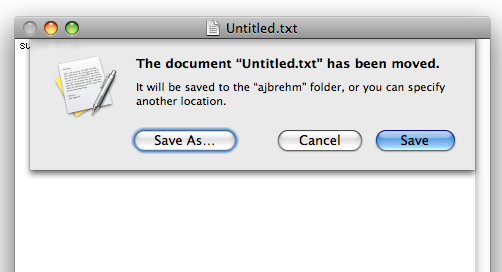
I just typed "super file" into TextEdit (the Mac's Notepad equivalent) and saved it in a file named "Untitled.txt" on the Desktop. While the file was still open I moved it to my home folder ("ajbrehm", which is not the Desktop folder). I went back to TextEdit, where the file was still open, added another few letters and told it to save the file.


The result was a dialogue box informing me that the file has been moved and will now be saved in the "ajbrehm" folder, unless I decide to "Save As...".

But by now I am sick of the file, so I erase it and empty the trash can.

When I now decide to save the file in TextEdit, TextEdit will create the file in the "ajbrehm" folder, where I last moved it before deleting it. (Erasing the file did not create any particular problem.)

But let's assume I want to access the important document created above from my desktop while keeping it in the folder where all the documents are.

I create a shortcut, which Mac OS X calls "Untitled.txt alias" and move that to the desktop.

Now I remember that my home directory is not the right place for important documents after all, so I move the document to my Documents folder.

After this little interuption I feel like I should continue working on my important document. Where was it? Doesn't matter, I have the shortcut on my desktop, right? I double-click the shortcut and my Untitled.txt file opens, in its new location. The shortcut was't "updated", it just continues to point to the same file, no matter where it is.

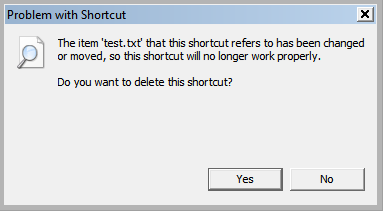
On Windows Vista I got the following result when I tried that:


So what exactly does Windows protect me from? Seems like it protects me from its filesystem's inability to keep track of files and recreate them at (my) will.

So, yes, I did think of that. I just happen to know that I don't need that protection and live perfectly fine without it and would absolutely LOVE it if I could deal like that with files at work.


Reply #22 Top
Just tested the trick with moving the file while it's open in Vista. The file moves and Windows doesn't complain. And when I save the next time in Notepad, a new file gets created in the original location.

The protection failed me.


Reply #23 Top
Weither you like it or not, as new hardware comes out developers will drop XP support. And when your machine finally takes the dive you'll be stuck with it. You really think developers will want to code drivers for an older, getting outdated OS? Time IS money.

I also like how many people are saying "I'm just going to wait for Windows 7".. I see that and I just let out a big SIGH. Windows 7 will not only require even more of a machine than Vista but it wont have 32bit support, leaving an even larger amount of machines with older AMD/Intel procs that much more outdated.
End of quote


I use Linux so I doubt I'll need to upgrade anything to run my OS of choice.

tsk tsk... Kona... no offense, but you have a track record of never liking anything new and then changing your tune once you get some REAL experience with something. As we said in a previous thread, you don't have any real experience with Vista on a good machine that is yours. Sorry, a friends pc simply does not count.
End of quote


Phoon - I had this verified the other day. I never said anything bad about XP when it came out. I was already using XP when I became a member of this forum.

I did say XP SP2 was bad. So what...

Who cares if you think I don't have any Vista time under my belt? I do. Top that off with all the comments I hear from my friends and customers at work to know how bad Vista is. It's all over the net. You guys here might like Vista but on the whole the public is not impressed.
Reply #24 Top
My 64bit vista with 4gb of ram and 2tb of hard drive and twin GEforce 8800's,works just fine.guess hardware really dose make the diff!!!!!!!!!!!!!!!!!!!!!!!!!!!!!!